

13.3. Sorting#
This section compares practical sorting approaches from baseline to efficient methods.
Learning Goals
Use Python built-in sorting effectively
Implement insertion, merge, bubble, and quicksort
Compare runtime trends across input patterns
Explain stability and memory trade-offs
Section Roadmap
Start with Python’s built-in tools — the right choice for real code.
Build and verify four classical algorithms from simplest to most efficient.
Use the comparison table and benchmark to connect implementation to complexity.
from time import perf_counter
import random
13.3.1. Design Paradigms#
The four algorithms included in this section illustrate three distinct approaches:
Brute force: scan and compare every candidate pair; simple but \(O(n^2)\) (e.g., bubble sort, insertion sort).
Divide-and-conquer: split the problem into smaller sub-problems, sort each, then combine; achieves \(O(n \log n)\) (e.g., merge sort, quicksort).
In-place vs. out-of-place:
An in-place sort rearranges elements around a pivot without allocating extra memory proportional to the input (e.g., bubble sort, insertion sort).
An out-of-place sort returns a new list and leaves the original untouched, which is useful when you need both the original and the sorted version (merge sort,
sorted(), and quicksort).
13.3.2. Python Built-in Sorting#
Python provides two built-in sorting tools for sequences:
|
|
|
|---|---|---|
Returns |
A new sorted list |
|
Original modified? |
No: original is untouched |
Yes: sorts in-place |
Works on |
Any iterable |
Lists only |
Both use Timsort — a hybrid merge/insertion sorting algorithm that is stable (if two items are equal, their original order stays the same) and \(O(n \log n)\) in the worst case. It is highly optimized for real workloads, including partially sorted data.
13.3.2.1. Key parameters#
reverse=True— sort in descending orderkey=callable— sort by a derived value rather than the element itself
The default advice is: Prefer Python’s built-in sorting tools (sorted() or .sort()) in production code. Hand-written sorting implementations are usually for learning, analysis, or specialized needs, not everyday use.
Now let us take a look at the sorted() function and the list.sort() method in terms of:
in-place vs out-of-place
the
keyparameterkeywithlambda
print("=== sorted() vs list.sort() ===")
nums = [5, 2, 9, 1, 5, 6]
print(f"sorted(nums):   {sorted(nums)}      sorted")    # returns a new sorted list — nums is unchanged
print(f"print(nums):    {nums}      unchanged")         # original list is untouched

nums.sort()         # sorts in-place — modifies nums directly, returns None
print(f"nums.sort():    {nums}      in-place")                   # nums is now sorted

print("\n=== Sorting with a key function ===")
# key=callable: sort by a derived value instead of the element itself
words = ["banana", "apple", "fig", "cherry"]
print(f"sorted(words, key=len):                 {sorted(words, key=len)}")               # sort by word length
print(f"sorted(words, key=len, reverse=True):   {sorted(words, key=len, reverse=True)}") # longest first
print(f"sorted(words, key=str.lower):           {sorted(words, key=str.lower)}")         # sort case-insensitively

print("\n=== key= with a lambda ===")
# lambda is useful when the sort criterion is not a named function
print(f"sort by last letter:    {sorted(words, key=lambda w: w[-1])}")   # ordered by final character (a, e, g, y)
print(f"sort by 2nd character:  {sorted(words, key=lambda w: w[1])}")    # sort by the second character of each word
=== sorted() vs list.sort() ===
sorted(nums):   [1, 2, 5, 5, 6, 9]      sorted
print(nums):    [5, 2, 9, 1, 5, 6]      unchanged
nums.sort():    [1, 2, 5, 5, 6, 9]      in-place

=== Sorting with a key function ===
sorted(words, key=len):                 ['fig', 'apple', 'banana', 'cherry']
sorted(words, key=len, reverse=True):   ['banana', 'cherry', 'apple', 'fig']
sorted(words, key=str.lower):           ['apple', 'banana', 'cherry', 'fig']

=== key= with a lambda ===
sort by last letter:    ['banana', 'apple', 'fig', 'cherry']
sort by 2nd character:  ['banana', 'cherry', 'fig', 'apple']
Lambda
key=lambda w: w[-1]
#          ^  ^--- w is now the word being evaluated
#          |
#          w is defined here — you could name it anything: word, x, item
A lambda function is equivalent to a named function:
def last_letter(w):
    letter = w[-1]      ### expression
    return letter

sorted(words, key=last_letter)  ### calling last_letter()
13.3.2.2. Stability and key=#
Stability in sorting means that when two elements compare as equal, their original relative order is preserved in the output. Python’s sorted() and .sort() are both stable.
Stability matters when records share the same key and you want original order preserved. This happens when you sort data in multiple passes. If you sort a list of students by score, a stable sort guarantees that students with the same score stay in whatever order they were before — letting you layer sorts predictably.
students = [
    {"name": "Ava",   "score": 90},
    {"name": "Ben",   "score": 90},  # same score as Ava — tied key
    {"name": "Cara",  "score": 85},
    {"name": "Dana",  "score": 85},  # same score as Cara — second tied pair
]

result = sorted(students, key=lambda s: s["score"], reverse=True)   ### sort by score, highest first
for s in result:
    print(f"{s['name']:6}  {s['score']}")       ### :6 means to left-align the name in a 6-character field

# Stable sort guarantees tied elements keep their original relative order:
#   Ava before Ben  (both 90, Ava was first in input)
#   Cara before Dana (both 85, Cara was first in input)
# An unstable sort might swap them — useful when layering multiple sorts
# (e.g., sort by score, then by grade level) without losing prior ordering.
Ava     90
Ben     90
Cara    85
Dana    85
### Exercise: Sort by Word Length
#   1. Given the list `words` below, use `sorted()` with `key=` to sort
#      by word length, shortest to longest.
#   2. Print the sorted list.
#   3. Two words have the same length. Does their relative order change?
#      What does this confirm about stability?
### Your code starts here.
words = ["banana", "apple", "cherry", "date", "elderberry", "fig"]


### Your code ends here.
['fig', 'date', 'apple', 'banana', 'cherry', 'elderberry']
13.3.3. Sorting Concepts & Intuition#
This section introduces core design paradigms and visual intuition before implementation details.
13.3.3.1. Algorithm Intuition#
The animations below show each algorithm working on the same unsorted input. Watch where the sorted region grows, how many passes are needed, and how much movement each approach requires. These visuals build intuition for the complexity differences before you read the code.
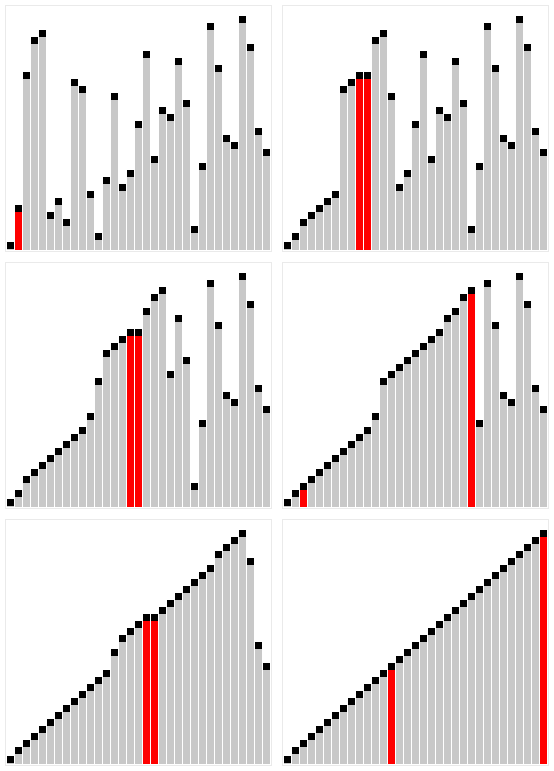
- Brute Force*: Builds a sorted region from the left, one element at a time. Each new element slides left past larger elements until it reaches its correct position — like inserting a playing card into a hand. (*also classified as a Decrease-and-Conquer algorithm.)
- In-place
- stable
- Best case $O(n)$ when the input is already sorted (only comparisons, no shifts). Average and worst case $O(n^2)$. Python's Timsort uses insertion sort internally for small sub-arrays.
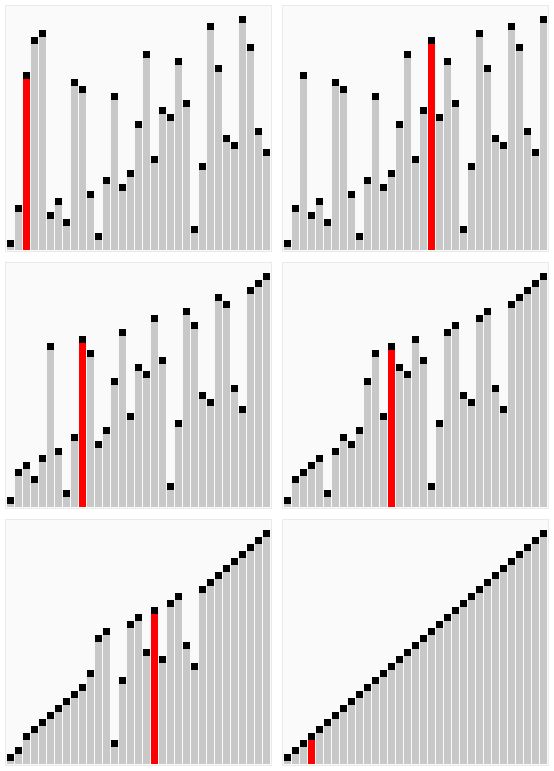
- Brute Force: Makes repeated passes through the list, swapping any adjacent pair that is out of order. After each pass, the largest unsorted element has “bubbled up” to its final position. An early-exit flag stops the loop as soon as a pass completes with no swaps.
- In-place
- stable
- $O(n^2)$ average and worst case. Best case $O(n)$ on already-sorted input (one pass, no swaps). Included for teaching and conceptual contrast only.
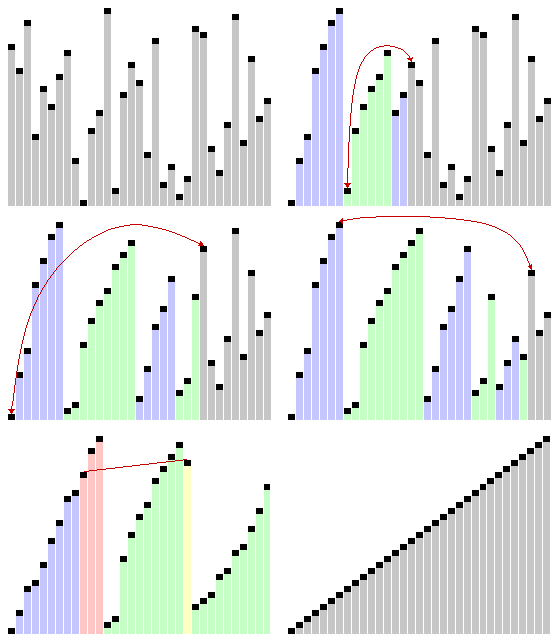
- Divide-and-Conquer: recursively split the list in half until each sub-list has one element, then merge sorted pairs back together. The merge step uses two pointers to interleave the halves in order.
- Out-of-place ($O(n)$ extra memory)
- stable
- $O(n \log n)$ best, average, and worst case — guaranteed regardless of input order. The consistent performance makes it a good choice when stability is required.
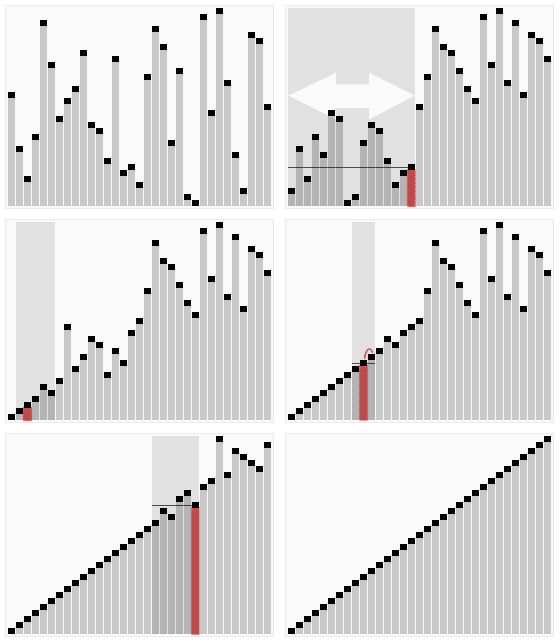
- Divide-and-Conquer by value: pick a pivot, partition all other elements into “less”, “equal”, and “greater” groups, then recursively sort the outer two. No merge step needed — the three pieces concatenate directly.
- Not stable
- $O(\log n)$ stack space on average. $O(n \log n)$ average with a randomly chosen pivot. Worst case $O(n^2)$ when the pivot consistently lands at one extreme (e.g., always the minimum on a sorted list). Typically the fastest general-purpose sort in practice.
13.3.4. Core Sorting Algorithms#
The following implementations are included for conceptual comparison and practice of sorting algorithms.
13.3.4.1. Insertion Sort#
Insertion sort builds a sorted section at the front of the list one element at a time. Think of sorting playing cards: you pick up each new card and slide it left past any cards that are larger, until it reaches its correct position. At every step, everything to the left of the current position is sorted; the right side is the unsorted remainder yet to be processed.
Time complexity: \(O(n^2)\) average/worst; \(O(n)\) best (already sorted; only comparisons, no shifts)
Space complexity: \(O(1)\) extra; fully in-place
Useful on small or nearly sorted inputs; Python’s Timsort uses insertion sort internally for small sub-arrays
Algorithm:
Start with the second element as the first element is assumed to be sorted.
Compare the second element with the first if the second is smaller then swap them.
Move to the third element, compare it with the first two, and put it in its correct position
Repeat until the entire array is sorted.
def insertion_sort(arr):                  # sorts in-place; mutates the list passed in
    for i in range(1, len(arr)):          # start at 1 since the first element is already "sorted"
        current_value = arr[i]                      # the "key" is the element we want to insert into the sorted portion of the list
        j = i - 1                           # j is the index of the last element in the sorted portion of the list

                                            # if the first one is greater the the second one,
        while j >= 0 and arr[j] > current_value:    # while there are still elements in the sorted portion and the current element is greater than the key
            arr[j + 1] = arr[j]         # shift the current element one position to the right to make room for the key
            j -= 1                          # move left in the sorted portion to compare the next element

        arr[j + 1] = current_value                  # insert the key into its correct position in the sorted portion of the list
    return arr                            # returns same (now-sorted) list for chaining

assert insertion_sort([]) == []
assert insertion_sort([1]) == [1]
assert insertion_sort([3, 1, 2]) == [1, 2, 3]
assert insertion_sort([1, 2, 3]) == [1, 2, 3]   # already sorted
assert insertion_sort([3, 2, 1]) == [1, 2, 3]   # reverse sorted
assert insertion_sort([2, 2, 1]) == [1, 2, 2]   # duplicates    ### edge case: duplicate values should be sorted correctly, and their relative order should be preserved (stable sort)
print('insertion_sort checks passed.')
insertion_sort checks passed.
# Step-by-step trace: watch insertion sort work on [3, 1, 4, 1].
# Each pass picks the next element (key) and slides it left to its correct position.
trace = [3, 1, 4, 1]
print(f"  start:             {trace}")
for i in range(1, len(trace)):
    key = trace[i]
    j = i - 1
    while j >= 0 and trace[j] > key:
        trace[j + 1] = trace[j]
        j -= 1
    trace[j + 1] = key
    print(f"  after placing {key} at index {j+1}: {trace}")
  start:             [3, 1, 4, 1]
  after placing 1 at index 0: [1, 3, 4, 1]
  after placing 4 at index 2: [1, 3, 4, 1]
  after placing 1 at index 1: [1, 1, 3, 4]
### Exercise: Count Comparisons
#   1. Write `insertion_sort_count(items)` that sorts a copy of items
#      using insertion sort logic and counts every comparison made.
#   2. Return a tuple: (sorted_list, comparison_count).
#   3. Test with [5, 2, 4, 6, 1, 3] and with [1, 2, 3, 4, 5, 6] (already sorted).
#   4. How do the comparison counts differ? What does this confirm about
#      best-case vs. average-case complexity for insertion sort?
### Your code starts here.


### Your code ends here.
unsorted input: [1, 2, 3, 4, 5, 6], comparisons: 12
sorted input  : [1, 2, 3, 4, 5, 6], comparisons: 5
13.3.4.2. Bubble Sort#
Bubble sort makes repeated passes through the list, comparing each adjacent pair and swapping them if they are out of order. After each full pass, the largest unsorted element has “bubbled up” to its final position at the end of the unsorted region. An early-exit flag (swapped) lets the loop terminate as soon as a full pass completes with no swaps, which means the list is already sorted.
Despite the optimization, bubble sort is \(O(n^2)\) on average and worst-case inputs. It is included here for conceptual contrast and complexity discussion, not for practical use.
Algorithm:
Sorts the array using multiple passes. After the first pass, the maximum goes to end (its correct position). Same way, after second pass, the second largest goes to second last position and so on.
In every pass, process only those that have already not moved to correct position. After k passes, the largest k must have been moved to the last k positions.
In a pass, we consider remaining elements and compare all adjacent and swap if larger element is before a smaller element. If we keep doing this, we get the largest (among the remaining elements) at its correct position.
def bubble_sort(items):
    n = len(items)
    for i in range(n):
        swapped = False
        for j in range(0, n - i - 1):
            if items[j] > items[j + 1]:
                items[j], items[j + 1] = items[j + 1], items[j]
                swapped = True
        if not swapped:
            break
    return items

assert bubble_sort([]) == []
assert bubble_sort([1]) == [1]
assert bubble_sort([3, 1, 2]) == [1, 2, 3]
assert bubble_sort([1, 2, 3]) == [1, 2, 3]   # already sorted — early-exit flag should trigger
assert bubble_sort([3, 2, 1]) == [1, 2, 3]   # reverse sorted
assert bubble_sort([2, 2, 1]) == [1, 2, 2]   # duplicates
print('bubble_sort checks passed.')
bubble_sort checks passed.
### Exercise: Count Swaps
#   1. Write `bubble_sort_count(items)` that sorts a copy of items
#      using bubble sort and counts every swap made.
#   2. Return a tuple: (sorted_list, swap_count).
#   3. Test with [3, 1, 2], [1, 2, 3] (already sorted), and [3, 2, 1] (reverse sorted).
#   4. Which input produces the most swaps? Does this match bubble sort's worst-case input?
### Your code starts here.


### uncomment to test your function:
# for data in [[3, 1, 2], [1, 2, 3], [3, 2, 1]]:
#     result, count = bubble_sort_count(data)
#     print(f"input {data}: sorted {result}, swaps: {count}")
### Your code ends here.
input [3, 1, 2]: sorted [1, 2, 3], swaps: 2
input [1, 2, 3]: sorted [1, 2, 3], swaps: 0
input [3, 2, 1]: sorted [1, 2, 3], swaps: 3
13.3.4.3. Merge Sort#
Merge sort follows a divide-and-conquer strategy: recursively split the list in half until every sub-list contains one element (a single element is trivially sorted), then repeatedly merge pairs of sorted sub-lists back into a single sorted list.
The merge step is where the work happens: two pointers scan the left and right halves simultaneously, always appending the smaller front element to the result. Because each element is visited once per level of recursion, each level costs \(O(n)\). The recursion depth is \(O(\log n)\) (halving \(n\) until size 1), so the total is \(O(n \log n)\) — and this holds for every input, regardless of order.
Time complexity: \(O(n \log n)\) best / average / worst
Space complexity: \(O(n)\) extra — each merge allocates a new list
Stable: equal elements maintain their original relative order
Algorithm:
Divide: Divide the list or array recursively into two halves until it can no more be divided.
Conquer: Each subarray is sorted individually using the merge sort algorithm.
Merge: The sorted subarrays are merged back together in sorted order. The process continues until all elements from both subarrays have been merged.
def merge(left, right):
    merged = []
    i = j = 0

    while i < len(left) and j < len(right):
        if left[i] <= right[j]:
            merged.append(left[i])
            i += 1
        else:
            merged.append(right[j])
            j += 1

    merged.extend(left[i:])
    merged.extend(right[j:])
    return merged

def merge_sort(items):
    if len(items) <= 1:
        return items[:]

    mid = len(items) // 2
    left = merge_sort(items[:mid])
    right = merge_sort(items[mid:])
    return merge(left, right)
### Exercise: Merge Two Sorted Lists
#   1. Write `merge_sorted(a, b)` that combines two already-sorted lists
#      into one sorted list.
#   2. Do not call sorted() or any sort function — use only the two-pointer
#      merge logic from the merge() function above.
#   3. Test with:
#      a = [1, 3, 5], b = [2, 4, 6]  → expected [1, 2, 3, 4, 5, 6]
#      a = [],        b = [1, 2, 3]  → expected [1, 2, 3]
#      a = [1, 1],    b = [1, 2]     → expected [1, 1, 1, 2]
### Your code starts here.


### Your code ends here.
[1, 2, 3, 4, 5, 6]
13.3.4.4. Quicksort#
Quicksort is also divide-and-conquer, but partitions by value rather than by position. It selects a pivot element and rearranges all other values into three groups: elements less than the pivot, elements equal to the pivot, and elements greater. It then recursively sorts the less-than and greater-than groups. No merge step is needed — the three already-sorted pieces concatenate directly into a sorted list.
Pivot choice determines performance. With a well-chosen pivot that splits the data roughly in half, recursion depth is \(O(\log n)\) and total work is \(O(n \log n)\). With a consistently bad pivot — for example, always picking the minimum value on an already-sorted list — one partition is always empty and the other has \(n-1\) elements, producing \(O(n^2)\) behaviour. Random pivoting avoids this: a random element is unlikely to be the extreme value on every level, so expected performance remains \(O(n \log n)\) across typical inputs.
Average: \(O(n \log n)\)
Worst-case: \(O(n^2)\) — degenerate pivot at every level
Space: \(O(\log n)\) average stack frames from recursion; \(O(n)\) worst-case
Algorithm:
Choose a Pivot: Select an element from the array as the pivot. The choice of pivot can vary (e.g., first element, last element, random element, or median).
Partition the Array: Re arrange the array around the pivot. After partitioning, all elements smaller than the pivot will be on its left, and all elements greater than the pivot will be on its right.
Recursively Call: Recursively apply the same process to the two partitioned sub-arrays.
Base Case: The recursion stops when there is only one element left in the sub-array, as a single element is already sorted.
def quicksort(items):
    if len(items) <= 1:
        return items[:]

    pivot = items[random.randint(0, len(items) - 1)]
    less = [x for x in items if x < pivot]
    equal = [x for x in items if x == pivot]
    greater = [x for x in items if x > pivot]

    return quicksort(less) + equal + quicksort(greater)
### Exercise: Three-Way Partition
#   Quicksort works by partitioning around a pivot. Practice the logic directly:
#   1. Write `partition(items, pivot)` that returns a tuple (less, equal, greater):
#      - less:    all elements < pivot
#      - equal:   all elements == pivot
#      - greater: all elements > pivot
#   2. Do not sort; just partition.
#   3. Test:
#      partition([3, 1, 4, 1, 5, 9, 2, 6, 5], 5)
#      expected: ([3, 1, 4, 1, 2], [5, 5], [9, 6])
### Your code starts here.


### Your code ends here.
less:    [3, 1, 4, 1, 2]
equal:   [5, 5]
greater: [9, 6]
13.3.5. APIs & Complexity#
This section compares sorting API contracts (in-place mutation with returned list vs returned new list), then connects those behaviors to complexity growth.
13.3.5.1. API Contracts#
A function’s contract is its behavior guarantee: what input it expects, what it returns, and whether it mutates its arguments. In other words, a contract is an agreement between a function and its caller: what the caller must provide, and what the function guarantees in return. All four implementations below should produce the same result as Python’s built-in sorted(). But equally important is how each algorithm interacts with its input, which is a distinction that matters every time you choose a sorting function in real code.
Two different API contracts:
insertion_sortandbubble_sortsort in-place: they rearrange the original list and also return the same list object for convenience. After the call, the variable you passed in has been modified.merge_sortandquicksort(as implemented here) return a new sorted list and leave the original untouched — the same contract as Python’s built-insorted(); by contrast,.sort()sorts in place and returnsNone.
The first cell below makes the in-place side-effect visible. The second cell runs all four algorithms on the same demo list; demo[:] (a shallow copy) is passed to the in-place functions so that demo survives unchanged for the next call.
# --- In-place side-effect ---
# insertion_sort (and bubble_sort) modify the list in place and return the same list.
# calling them without a copy permanently changes the original list.
victim = [5, 2, 4, 6, 1, 3]
result = insertion_sort(victim)
print('return value :', result)   # sorted list (same object as victim)
print('victim after :', victim)   # [1, 2, 3, 4, 5, 6] — original is gone!

print()

# --- Consistent demo using copies ---
# because insertion_sort and bubble_sort mutate their argument, we pass demo[:]
# (a copy) so that demo stays intact for each subsequent call.
demo = [5, 2, 4, 6, 1, 3]
print('insertion:', insertion_sort(demo[:]))  # copy; in-place mutates input
print('merge    :', merge_sort(demo))          # new list; demo unchanged
print('bubble   :', bubble_sort(demo[:]))      # copy; in-place mutates input
print('quick    :', quicksort(demo))           # new list; demo unchanged
print('builtin  :', sorted(demo))              # new list; demo unchanged
print()
print('demo unchanged:', demo)                 # still [5, 2, 4, 6, 1, 3]
return value : [1, 2, 3, 4, 5, 6]
victim after : [1, 2, 3, 4, 5, 6]

insertion: [1, 2, 3, 4, 5, 6]
merge    : [1, 2, 3, 4, 5, 6]
bubble   : [1, 2, 3, 4, 5, 6]
quick    : [1, 2, 3, 4, 5, 6]
builtin  : [1, 2, 3, 4, 5, 6]

demo unchanged: [5, 2, 4, 6, 1, 3]
13.3.5.2. Complexity Growth#
The comparison table above names the Big O of each algorithm. The table below makes those classes concrete: for large \(n\), the gap between \(O(n^2)\) and \(O(n \log n)\) is not a small constant factor — it is the difference between feasible and impractical.
import math

sizes = [10, 100, 1_000, 10_000, 100_000, 1_000_000]
print(f"{'n':>8} {'log2(n)':>10} {'n (O(n))':>12} {'n*log2(n)':>14} {'n^2':>14}")
for n in sizes:
    print(f"{n:>8} {math.log2(n):>10.2f} {n:>12} {n*math.log2(n):>14.2f} {n**2:>14}")
       n    log2(n)     n (O(n))      n*log2(n)            n^2
      10       3.32           10          33.22            100
     100       6.64          100         664.39          10000
    1000       9.97         1000        9965.78        1000000
   10000      13.29        10000      132877.12      100000000
  100000      16.61       100000     1660964.05    10000000000
 1000000      19.93      1000000    19931568.57  1000000000000
13.3.5.3. Sorting Cheat Sheet#
The table below summarizes time complexity, space complexity, and practical use cases. It includes both algorithms implemented here and a few additional reference algorithms for broader comparison.
Algorithm |
Category |
Time (best) |
Time (avg) |
Time (worst) |
Space |
In-place? |
Stable? |
Recommended for |
|---|---|---|---|---|---|---|---|---|
Insertion sort |
Naive |
O(n) |
O(n²) |
O(n²) |
O(1) |
Yes |
Yes |
Small or nearly-sorted data |
Bubble sort |
Naive |
O(n) |
O(n²) |
O(n²) |
O(1) |
Yes |
Yes |
Teaching only |
Selection sort |
Naive |
O(n²) |
O(n²) |
O(n²) |
O(1) |
Yes |
No |
Teaching only |
Shell sort |
Hybrid |
O(n log n)† |
Varies by gap sequence |
O(n²) |
O(1) |
Yes |
No |
Moderate data; memory-constrained cases |
Smooth sort |
Hybrid |
O(n) |
O(n log n) |
O(n log n) |
O(1) |
Yes |
No |
Nearly-sorted data; rare in practice |
Merge sort |
Efficient |
O(n log n) |
O(n log n) |
O(n log n) |
O(n) |
No |
Yes |
Stable sort required; linked lists |
Quicksort |
Efficient |
O(n log n) |
O(n log n) |
O(n²) |
O(log n)* |
No (here) |
No |
General-purpose; typically fastest |
Heapsort |
Efficient |
O(n log n) |
O(n log n) |
O(n log n) |
O(1) |
Yes |
No |
Guaranteed O(n log n); no extra memory |
Timsort |
Efficient |
O(n) |
O(n log n) |
O(n log n) |
O(n) |
No |
Yes |
Python’s built-in; best real-world choice |
Python |
Built-in |
O(n) |
O(n log n) |
O(n log n) |
O(n)* |
|
Yes |
Default choice for all real code |
* Quicksort space O(log n) is the call stack depth for average case; worst case stack is O(n). For this notebook’s out-of-place implementation, additional list allocation is also used.
† Shell-sort bounds depend on the chosen gap sequence; values shown are common teaching approximations.
Default advice: Prefer Python’s built-in sorted() or .sort() in production code. Hand-written sorting implementations are usually for learning, analysis, or specialized needs, not everyday use. Study algorithms to understand trade-offs, Big \(O\) reasoning, and algorithm design — knowledge that transfers beyond Python.
13.3.6. Evaluation#
This section moves from correctness checks to performance benchmarking and then to non-comparison sorting approaches.
13.3.6.1. Validating Correctness#
All four implementations must return the same result as Python’s built-in sorted() for any valid input. Randomized testing is used rather than hand-picked cases because it exercises orderings and value distributions that manual test design tends to miss — including duplicates, already-sorted inputs, and reverse-sorted inputs across many sizes. Always run correctness checks before timing: a subtle bug that only surfaces on certain inputs could silently corrupt the benchmark results.
for _ in range(50):                                         ### a loop of 50 random checks to catch edge cases
    data = [random.randint(0, 1000) for _ in range(60)]     ### generate a list of 60 random integers between 0 and 1000
    expected = sorted(data)                                 ### sort list using Python's built-in sorted()

    assert insertion_sort(data[:]) == expected
    assert merge_sort(data) == expected
    assert bubble_sort(data[:]) == expected
    assert quicksort(data) == expected

print('All randomized checks passed.')
All randomized checks passed.
13.3.6.2. Input Pattern#
Pattern matters. Compare random, sorted, reverse, and duplicate-heavy data.
Timing continuity:
time.time()works for basic measurement.time.perf_counter()is preferred in these short benchmarks for better precision.
Connection to Chapter 08:
As before, use timing to support Big O intuition rather than focusing on tiny decimal differences.
(See also 1002-searching.ipynb for the 30-repeat timing utility and a discussion of preprocessing cost.)
Predict before running: For each algorithm, which input pattern do you expect to be fastest — random, sorted, reverse, or duplicates? Write your predictions before executing the cell.
Specific questions to consider:
Insertion sort is \(O(n)\) on already-sorted data. Which column should confirm this?
Bubble sort has an early-exit flag. Should sorted input be faster than reverse-sorted?
Quicksort with a random pivot should not degrade on any particular pattern — do the numbers agree?
# Shared timing utility — see also 1002-searching.ipynb for the 30-repeat version.
def average_runtime(fn, *args, repeats=8):
    total = 0.0
    for _ in range(repeats):
        start = perf_counter()
        fn(*args)
        total += perf_counter() - start
    return total / repeats

n = 1200
random_data = [random.randint(0, 10_000) for _ in range(n)]
sorted_data = sorted(random_data)
reverse_data = sorted_data[::-1]
duplicate_data = [random.choice([1, 2, 3, 4, 5]) for _ in range(n)]

datasets = [
    ('random', random_data),
    ('sorted', sorted_data),
    ('reverse', reverse_data),
    ('duplicates', duplicate_data),
]

print(f"{'pattern':>12} {'bubble':>10} {'insertion':>12} {'merge':>10} {'quick':>10} {'builtin':>10}")
for label, data in datasets:
    t_bubble = average_runtime(lambda d: bubble_sort(d[:]), data)
    t_insert = average_runtime(lambda d: insertion_sort(d[:]), data)
    t_merge = average_runtime(merge_sort, data)
    t_quick = average_runtime(quicksort, data)
    t_builtin = average_runtime(sorted, data)
    print(f"{label:>12} {t_bubble:>10.6f} {t_insert:>12.6f} {t_merge:>10.6f} {t_quick:>10.6f} {t_builtin:>10.6f}")
pattern bubble insertion merge quick builtin
      random   0.031566     0.014358   0.001012   0.000995   0.000036
      sorted   0.000032     0.000065   0.000722   0.000906   0.000003
reverse 0.038851 0.027725 0.000751 0.000998 0.000004
duplicates 0.029354 0.012030 0.001040 0.000128 0.000029
13.3.6.3. Beyond Comparison#
From the timing table above, even the fastest comparison-based methods still scale around \(O(n \log n)\) as input grows.
All four algorithms above sort by comparing pairs of elements. Comparison sorting has a proven theoretical lower bound of \(O(n \log n)\) in the general case.
Counting sort sidesteps this limit entirely. Instead of comparing elements, it uses each element’s value as an array index, tallying how many times each value appears, then reconstructing the sorted output. This runs in \(O(n + k)\) where \(k\) is the range of input values.
The trade-off: counting sort only works on integers (or values mappable to a bounded integer range). It cannot sort arbitrary objects, floats, or strings directly. When \(k\) is small relative to \(n\) (e.g., sorting exam scores 0–100 for thousands of students), it is significantly faster than any comparison sort.
### Exercise: Counting Sort
#   Unlike comparison-based sorts, counting sort runs in O(n + k) where k is the value range.
#   Implement `counting_sort_nonnegative(items)`:
#   1. Accept only nonnegative integers; raise `ValueError` otherwise.
#   2. Return a new sorted list (do not sort in place).
#   3. As a comment, explain when counting sort is preferable to merge sort.
### Your code starts here.


### Your code ends here.
[0, 1, 1, 2, 2, 3, 3]
counting_sort_nonnegative checks passed.