
2.3. Built-in Types#
A type describes what kind of value an object has and what operations make sense for it. The basic data types discussed here are built-in types that come with Python. When you design your own classes, you will be designing your own types.
Python is dynamically typed, which means you don’t have to declare the data type when creating a variable. The interpreter will figure it out at run time. For example, the variable x below will receive proper types without user intervention.
x = 10                ### int
x = 10.0              ### float
x = "hello"           ### str
x = [1, 2, 3, ]       ### list
2.3.1. Python Built-in Types#
Python has standard types built into the interpreter. The principal built-in types are: numerics, sequences, mappings, classes, instances, and exceptions. These built-in types are shipped with Python and are readily available to be used. New/custom types are created through designing new classes.
The commonly used data types can be organized as table below.
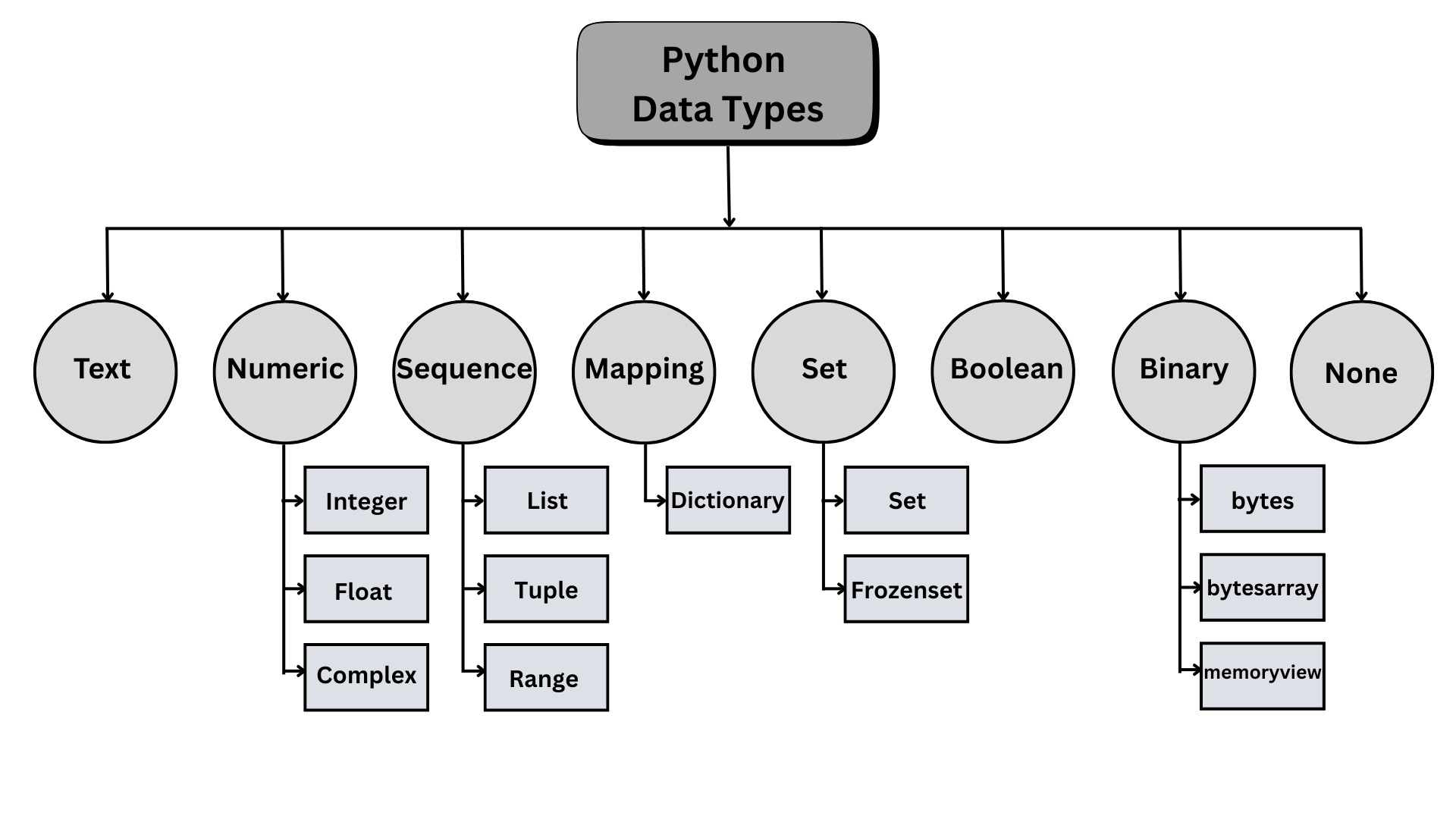
Fig. 2.1 Python built-in data types#
The following table shows that:
The built-in types can be grouped into literal and collection types.
The text (
str) type is listed as a special sequence type, whereas other sequence types are data collections.Boolean (
bool) type is a subclass of the integer (int) type.
Group |
No. |
Category |
Types |
Remarks |
Sample Use Case |
|---|---|---|---|---|---|
Literals |
1 |
Numeric |
|
Numbers for mathematical operations |
Counts, indices, ages, prices, measurements |
2 |
Text sequence |
|
Text and character data |
Names, messages, file paths |
|
3 |
Boolean |
|
Logical values (True/False) |
Flags, conditions, toggle states |
|
4 |
Null |
|
Represents absence of value |
Absence of value, default state |
|
Collections |
5 |
Sequence |
|
Ordered collections of items |
Shopping cart items, student grades, coordinates, RGB colors |
6 |
Binary |
|
Binary data and memory manipulation |
Image data, encrypted content |
|
7 |
Set |
|
Unordered collections of unique items |
Removing duplicates, membership testing |
|
8 |
Mapping |
|
Key-value pairs |
User profiles, configuration settings |
*Note that the standard type hierarchy in the Python Language Reference lists 8 different built-in data types with a slightly different categorization
2.3.2. Type Checking#
Use
type()when you want to inspect exactly what kind of object you have.Use
isinstance()when your code needs to accept a family of related types.
### type()

a = type(1)
b = type(2.0)
c = type(1 == 1)
d = type("")

e = type([1, 2, 3])
f = type({"a": 1, "b": 2})
print(a, b, c, d, e, f, sep='\n')
<class 'int'>
<class 'float'>
<class 'bool'>
<class 'str'>
<class 'list'>
<class 'dict'>
### isinstance()

x = 5
isinstance(x, int)      # True
isinstance(x, str)      # False
isinstance(x, float)    # False

x = 3.14
isinstance(x, (int, float))   # True — passes if x matches ANY type in the tuple
True
Note that a Boolean value (True or False) is also an integer (int).
### bool is int

print(type(True))
print(isinstance(True, bool)) # True; True is a Boolean value
print(isinstance(True, int))  # True; bool is a subclass of int in Python
<class 'bool'>
True
True
### Exercise: Check value types
# The variables below describe one item in a fruit order.
# 1. Use type() to print the type of each variable.
# 2. Use isinstance() with the tuple (int, float) to print whether
#    quantity, price, and name are numbers.
name = "banana"
quantity = 6
price = 0.25
in_stock = True
### Your code starts here.


### Your code ends here.
<class 'str'>
<class 'int'>
<class 'float'>
<class 'bool'>
True
True
False
2.3.3. Type Conversion#
Type conversion is the general process of converting a value from one data type to another. There are two ways of type conversion to change type:
Type casting (explicit conversion) is performed by the programmer (e.g., using
int("42")) using the type constructors.Type coercion (implicit conversion) is performed automatically by the Python interpreter (e.g.,
3 + 4.5results in7.5, where the integer3is coerced to a float to match the other operand).
2.3.3.1. Type Casting#
Built-in Python types are also constructor functions that create a new object of a given type, called type casting.
Function |
Converts To |
Example |
Explanation |
|---|---|---|---|
|
Integer |
|
Converts string “10” to integer 10 |
|
Floating-point number |
|
Converts string “3.14” to floating-point 3.14 |
|
String |
|
Converts integer 25 to string “25” |
|
Boolean ( |
|
0 converts to False, non-zero values convert to True |
|
List |
|
Converts string into list of individual characters |
|
Tuple |
|
Converts list to immutable tuple |
|
Set |
|
Converts list to set, removing duplicate values |
You use constructor functions to convert values explicitly when conversion is valid. For example, the types int, float, and str can be used as constructor functions, meaning you can call the type itself to create/convert a value. These are both type keywords and built-in functions you call to construct objects. For example:
intis the integer type and can also take a floating-point number and convert it to an integer (always rounding down).floatrepresents the floating-point type and can also be used to convert an integer to a floating-point value.strcan convert an integer or floating-point number to a string.
Type casting (explicit conversion) operation is done by the programmer. Type casting is necessary in cases like, e.g., when you want a numeric input from a user. Since the value input from input() is always a string, you must cast it to an integer (or float) to use it as a number.
### type casting

a = int(3.33)       ### turn 3.33 to int 3
b = float(3)        ### turn int 3 to float 3.0
c = str(3)          ### turn int 3 to str '3'
d = float('12.6')   ### turn str into float

print(a, b, c, d, sep='\n')
print()
print(type(a), type(b), type(c), type(d), sep='\n')
3
3.0
3
12.6

<class 'int'>
<class 'float'>
<class 'str'>
<class 'float'>
text_count = "15"
count = int(text_count)
rate = float("0.0825")
message = str(count) + " items"

print(count, type(count).__name__)
print(rate, type(rate).__name__)
print(message, type(message).__name__)
15 int
0.0825 float
15 items str
2.3.3.2. Type Coercion#
Python sometimes performs automatic conversion, called coercion, in mixed numeric expressions.
### type coercion

a = 7             # int
b = 3.0           # float
c = a + b         # Python automatically converts 'a' to a float (7.0) before addition
print(c)          # Output: 10.0
print(type(c))    # Output: <class 'float'>
10.0
<class 'float'>
result = 3 + 2.5
print(result)
print(type(result))
print(type(result).__name__)
5.5
<class 'float'>
float
### Exercise: Convert input-like text
# Convert the string values below, then compute the total cost.
quantity_text = "6"
price_text = "4.25"
### Your code starts here.


### Your code ends here.
25.5
2.3.3.3. Type Hinting#
Type hints document the types a programmer expects. Python does not enforce these hints at runtime by default, but editors and checkers can use them to catch mistakes earlier. So, type hinting, also called type annotation, lets you write the expected type next to a variable name. A type hint is a note for humans and development tools, as Python does not enforce it at runtime.
To add type hints, you do variable annotation, in which you add the types after the variable names. So, instead of
name = "Alice"
age = 20
height = 5.9
is_active = True
You write:
name: str = "Alice"
age: int = 20
height: float = 5.9
is_active: bool = True
The annotation after the colon says what kind of value the variable is expected to hold.
When defining functions, you can do type hinting by using function annotation, which is the same notation in function parameters and return values with ->:
def add(a: int, b: int) -> int:
    return a + b
For now, remember two rules:
type hints improve readability and help tools catch mistakes early;
type hints do not convert values or stop the program at runtime.
Examples of variable annotations of type hinting:
name: str = "Alice"
age: int = 30
gpa: float = 3.8
is_active: bool = True
Examples of funtional annotations of type hinting:
def format_score(name: str, score: float) -> str:
    return f"{name}: {score:.1f}"

print(format_score("Maya", 92))
Maya: 92.0
2.3.4. Core Scalar Types#
The most common scalar types are int, float, str, bool, and NoneType.
Type |
Example |
Common use |
|---|---|---|
|
|
counts, indexes, whole numbers |
|
|
measurements, averages, rates |
|
|
text |
|
|
conditions and flags |
|
|
missing or not-yet-available value |
To print the values and types of these types, we can use a for loop to make the example more succinct.
*The __name__ is a dunder (double under) and is a name attribute of any class. type(value) gives you <class 'TYPE_NAME'> while with .__name__ you get just ‘TYPE_NAME’ such as ‘int’.
items = 42
average = 3.14
language = "Python"
finished = False
missing = None

for value in [items, average, language, finished, missing]:
    print(f"{repr(value):12} {type(value).__name__}")
42           int
3.14         float
'Python'     str
False        bool
None         NoneType
2.3.4.1. Strings#
Python represents sequences of letters as strings, because the letters are strung together like beads on a necklace. Strings are one of the most commonly used built-in types. Some features about strings in Python:
A string is a sequence of characters enclosed in quotes.
You can use single, double, or triple quotation marks to create a string; they are all legal.
Double quotes make it easy to write a string that contains an apostrophe, which is treated the same as single quotes in programming.
You can index and slice strings, but you cannot mutate them in place:
Immutable: Strings are immutable sequences. Once you create a string, you cannot change it, just like all immutable objects. So, to “modify” a string, you have to build a new string from old ones.
Indexing & slicing: Unlike other literal objects, strings are indexable and they use zero-based indexing and negative indexing, with which you can use
[start:stop:step]for indexing and slicing.
2.3.4.1.1. String Creation#
Strings can be created using single or double quotes. You can also wrap double quotes around single quotes if you need to include a quote inside the string.
s1 = 'hello'
s2 = "hello"
s3 = """hello"""

print(s1, s2, s3, sep="\n")
hello
hello
hello
2.3.4.1.2. Concatenation#
The + operator works with strings; it joins two strings into a single string, a process known as concatenation:
'Well, ' + "it's a small " + 'world.'
"Well, it's a small world."
The multiplication (*) operator also works with strings; it makes multiple copies of a string and concatenates them.
'Hello! ' * 4
'Hello! Hello! Hello! Hello! '
2.3.4.1.3. len()#
Python provides a useful function called len that computes the length of a string. Notice that len counts the letters between the quotes, but not the quotes. In collection types, len counts the number of elements in the collection.
fruit = "apple"
fruits = ["apple", "banana", "cherry"]    ### this is a list, elements are in []

print(len(fruit))
print(len(fruits))
5
3
2.3.4.1.4. Quoation Marks & Escaping#
An escape sequence is a combination of a backslash \ with a special character/symbol to treat the special characters as regular strings.
Observe the following two strings. You see that we are trying to honor the single quote in a pair of double quotes. For that, you can either:
enclose the single quotation mark inside the double quotation marks as in the first example, or enclose the double quote with single quotes like the 2nd.
use an escape sequence. Note that in s3, we have three single quotation marks, and we are able to produce the same results as the first example.
Starting from s4, we have a syntax error because the quotation marks are not properly closed.
s1 = "It's a sunny day."   ### double quote enclose single
s2 = 'It"s a sunny day.'   ### ... but legal
s3 = 'It\'s a sunny day.'  ### escape single quote

print(s1, s2, s3, sep="\n")
It's a sunny day.
It"s a sunny day.
It's a sunny day.
%%expect SyntaxError

s4 = 'It's a sunny day.'   ### illegal: not closed
s5 = "It"s a sunny day."   ### illegal: not closed
print(s4, s5, sep="\n")
  Cell In[23], line 1
    s4 = 'It's a sunny day.'   ### illegal: not closed
                           ^
SyntaxError: unterminated string literal (detected at line 1)
Commonly used escape sequences are as follows.
Sequence |
Meaning |
|---|---|
|
Single quote inside single-quoted string |
|
Double quote inside double-quoted string |
|
Backslash literal |
|
Newline |
|
Tab |
Some examples of escape sequences are:
print("First line \n Second line")      ### \n: gives new line (break)
print("Name:\tDoris")                   ### \t: tab
print("He said \"Python is great!\"")   ### print " inside ""
print('I\'m learning Python')           ### show ' as a character, not quotation mark
First line
 Second line
Name:	Doris
He said "Python is great!"
I'm learning Python
2.3.4.1.5. Indexing and Slicing#
Strings are sequences of characters. You can access specific elements using square bracket notation. Python indexing starts at zero. Negative indexing in slicing starts at -1 from the end of the array.
Slice notation allows you to grab parts of a string using the syntax of [START:STOP:STEP]. Use a colon to specify the start and stop indices. The stop index is not included.
s = 'hello'
print(s[0])
print(s[4])
print(s[-1])
h
o
o
word = "Python"
print(word[0])
print(word[-1])
print(word[0:3])
print(word.lower())
P
n
Pyt
python
Ada Lovelace (1815-1852) is considered the first computer programmer in the world.
first = "Ada"
last = "Lovelace"
full_name = f"{first} {last}"
print(full_name)
print(full_name.upper())
print(full_name[0])
print(full_name[0:3])
print(full_name[:-1])
Ada Lovelace
ADA LOVELACE
A
Ada
Ada Lovelac
s = 'applebananacherry'
print(s[0:])     ### applebananacherry
print(s[:5])     ### apple
print(s[5:11])   ### banana
print(s[-6:])    ### cherry
print(s[-6:0])   ###
print(s[-6:-1])  ### cherr (stop exclusive)
applebananacherry
apple
banana
cherry

cherr
### Exercise: Scalar types
# Create one int, one float, one string, one Boolean, and one None value.
# Print each value and its type name.
### Your code starts here.


### Your code ends here.
3 int
4.99 float
Ada str
True bool
None NoneType
2.3.5. Collection Types#
Python’s data structure are the built‑in container types you use to store, organize, and operate on groups of items/values. The four main data structure types are: list, tuple, dictionary, and set.
The commonly used built-in/standard data structures can be grouped as:
Sequence Types
Set Types
Mapping Types
Collections (broad category)
├── Sequence Types (ordered, indexed)
│   ├── list
│   ├── tuple
│   ├── str (string)
│   ├── range
│   └── bytes/bytearray
│
├── Set Types (unordered, no duplicates)
│   ├── set
│   └── frozenset
│
└── Mapping Types (key-value pairs)
    └── dict
Collections hold multiple values. This chapter only introduces the main collection types; later chapters develop them in depth.
Type |
Literal form |
Main idea |
Mutable |
|---|---|---|---|
|
|
ordered, mutable sequence |
Yes |
|
|
ordered, immutable sequence |
No |
|
|
key-value mapping |
Yes |
|
|
unordered unique values |
Yes |
Among them, list, tuple, and range are sequence types. Also, strings are considered a sequence type (a kind of collection) because they behave like collections of characters, although conceptually, in many languages other than Python, strings are considered primitives, not collections.
range is debatable as a “collection”; it’s really a lazy sequence generator, not a traditional data structure. It does look like a sequence, so Python treats it as one. Note that range stores a formula, not data; it computes values on demand. Therefore, range is a sequence protocol implementer, not a data container.
A set object is an “unordered collection of distinct hashable objects. Common uses include membership testing, removing duplicates from a sequence, and computing mathematical operations such as intersection, union, difference, and symmetric difference” [cite:pPython Standard Library_2026].
Mapping in Python refers to data types that store key-value pairs, where each key is associated with a corresponding value. The most common mapping type is the dictionary (dict).
### examples of the collection types

fruit_list = ["apple", "banana", "apple", "cherry"]
point_tuple = (3, 5)
fruit_set = set(fruit_list)
student_dict = {"name": "Maya", "score": 92}

print(fruit_list)
print(point_tuple)
print(fruit_set)
print(student_dict)
['apple', 'banana', 'apple', 'cherry']
(3, 5)
{'cherry', 'banana', 'apple'}
{'name': 'Maya', 'score': 92}
2.3.5.1. Lists (Ordered Collections)#
Lists store multiple items in order and are mutable (values can be changed after creation). Lists, just like tuple and range, are sequences of elements (similar to the array in many other languages) in square brackets, separated by commas.
numbers = [1, 2, 3, 4, 5]
fruits = ["Apple", "Banana", "Cherry"]
mixed = [1, "hello", 3.14, True]
empty_list = []

print(f"Numbers: {numbers}")
print(f"Fruits: {fruits}")
print(f"Mixed: {mixed}")
print(f"Empty list: {empty_list}")
Numbers: [1, 2, 3, 4, 5]
Fruits: ['Apple', 'Banana', 'Cherry']
Mixed: [1, 'hello', 3.14, True]
Empty list: []
Common list operations:
Append:
numbers.append(6)→[1, 2, 3, 4, 5, 6]Access/Indexing:
numbers[0]→1Slicing:
numbers[1:3]→[2, 3]Length:
len(numbers)→5Update:
numbers[0] = 99→[99, 2, 3, 4, 5, 6]
my_list = ['a', 'b', 'c']

my_list.append('d')
my_list[0]
my_list[1:3]
len(my_list)
my_list[0] = 'NEW'
fruits = ["apple", "banana", "cherry"]        ### create a list by assignment
print(f"\nOriginal list: {fruits}")

fruits.append("date")                         ### mutable: update/change the list
print(f"After append: {fruits}")

print(f"First fruit: {fruits[0]}")            ### indexing
print(f"Number of fruits: {len(fruits)}")     ### length
Original list: ['apple', 'banana', 'cherry']
After append: ['apple', 'banana', 'cherry', 'date']
First fruit: apple
Number of fruits: 4
fruits[2] = "cranberry"                     ### lists are mutable: modify an element
print(f"After modification: {fruits}")
After modification: ['apple', 'banana', 'cranberry', 'date']
Lists can contain any data type, including other lists (nested). You can access elements using list indexing. For nested lists, use chaining/stacking square brackets.
lst = [1, 2, [3, 4]]
lst[2][1]             ### 4

nest = [1, 2, 3, [4, 5, ['target']]]
nest[3][2][0]                         ### 'target'
print(nest[3][2][0])                  ### target
print(nest[3][2][0][0])               ### t (a list is a sequence)
target
t
2.3.5.2. Tuples (Immutable Sequences)#
Tuples are similar to lists, but they cannot be changed after creation (immutable). So, use tuples when you want to ensure data won’t change:
fruits = tuple(fruits)
print(f"\nConverted to tuple: {fruits}")            ### ( )
print("first element in coordinate: ", fruits[0])   ### indexing
Converted to tuple: ('apple', 'banana', 'cranberry', 'date')
first element in coordinate:  apple
rgb_color = (255, 128, 0)
single = (42,)             # Note the comma for single-item tuple
Since tuples are immutable, the following operation would generate an error:
%%expect TypeError
fruits[2] = "cherry"  # This would cause an error because tuples are immutable!
TypeError: 'tuple' object does not support item assignment
2.3.5.3. Mapping: dictionary#
In Python, a mapping type is a collection that stores data as key–value pairs, where each key is unique and maps to a corresponding value. The most common mapping type is the dictionary (dict), which allows flexible data organization and fast lookup, insertion, and modification of values by key rather than numerical index. An example of a Python dictionary:
student = {
    "name": "Alice",
    "age": 20,
    "major": "IST"
}
student
{'name': 'Alice', 'age': 20, 'major': 'IST'}
Common dictionary operations:
Access:
student["name"]→"Alice"Add/Update:
student["gpa"] = 3.8Keys:
student.keys()→dict_keys(['name', 'age', 'major'])Values:
student.values()→dict_values(['Alice', 20, 'Computer Science'])
student = {
    "name": "Alice",
    "age": 20,
    "major": "CS"
}

### the dict object
print(f"student: {student}\n")

### access
print(f"Student Name: {student['name']}\n")   ### 1. access value by key

### update
student["major"] = "IST"                     ### 2. update: MUTABLE
student["GPA"] = 3.5                        ### 2. add new key-value pair: MUTABLE

### object after update
print(f"student: {student}\n")

### keys and values
print(student.keys())                       ### 3. keys
print(student.values())                     ### 4. values
student: {'name': 'Alice', 'age': 20, 'major': 'CS'}

Student Name: Alice

student: {'name': 'Alice', 'age': 20, 'major': 'IST', 'GPA': 3.5}

dict_keys(['name', 'age', 'major', 'GPA'])
dict_values(['Alice', 20, 'IST', 3.5])
2.3.5.4. Sets#
A set is an unordered collection of unique elements. Sets are useful for removing duplicates and performing mathematical set operations.
Key characteristics:
Unordered: Elements have no defined order
Unique: Automatically removes duplicate values
Mutable: Can add/remove elements
No indexing: Cannot access elements by position
# Creating sets
unique_numbers = {1, 2, 3, 4, 5}
print(f"Set: {unique_numbers}")

# Duplicates are automatically removed
data = {5, 2, 8, 2, 5, 9}
print(f"Unique values: {data}")

# Creating from a list
measurements = [23.5, 24.1, 23.5, 25.0]
unique = set(measurements)
print(f"From list: {unique}")
Set: {1, 2, 3, 4, 5}
Unique values: {8, 9, 2, 5}
From list: {24.1, 25.0, 23.5}
Because a set has no order, Python may display its items in any order. When you need a predictable order, pass the set to the built-in sorted() function. It returns a new list with the items in ascending order (alphabetical for strings) and leaves the set unchanged.
fruits = {"cherry", "apple", "banana", "apple"}
print(sorted(fruits))       # ['apple', 'banana', 'cherry']
print(sorted([3, 1, 2]))     # [1, 2, 3]
['apple', 'banana', 'cherry']
[1, 2, 3]
# Basic set operations
set_a = {1, 2, 3}
set_b = {3, 4, 5}

print(f"Union: {set_a | set_b}")          # All elements
print(f"Intersection: {set_a & set_b}")   # Common elements
print(f"Difference: {set_a - set_b}")     # In A but not B
Union: {1, 2, 3, 4, 5}
Intersection: {3}
Difference: {1, 2}
### Exercise: Choose basic collections
# 1. Store three city names in a list.
# 2. Store one student's name and grade in a dictionary.
# 3. Use a set to remove duplicate course codes.
course_codes = ["PY", "DS", "PY", "SQL", "DS"]
### Your code starts here.


### Your code ends here.
['Rolla', 'Chicago', 'Boston']
{'name': 'Maya', 'grade': 92}
{'DS', 'PY', 'SQL'}
2.3.5.5. Mutability#
Mutability and order are two important characteristics of Python data structures, summarized in the table below.
Type |
Literal |
|
Ordered |
Usage |
|---|---|---|---|---|
Sequence Types |
||||
list |
|
Yes |
Yes |
General purpose; dynamic arrays; index/slice access. |
tuple |
|
No |
Yes |
Fixed records; function returns; hashable if elements are.* |
range |
|
No |
Yes |
Memory-efficient integer sequences; iteration. |
str |
|
No |
Yes |
Text; immutable character sequences. |
Set Types |
||||
set |
|
Yes |
No |
Unique items; membership testing; set operations. |
frozenset |
|
No |
No |
Immutable set; dict keys; set elements. |
Mapping Types |
||||
dict |
|
Yes |
Yes** |
Key-value lookups; counting; grouping; configuration. |
Notes:
* Tuples are hashable only if all elements are hashable.
** Dict ordering guaranteed in Python 3.7+.
2.3.6. Summary#
Types describe the values and operations an object supports.
Use
type()andisinstance()to inspect values.Constructor functions convert values when conversion is valid.
Built-ins such as
len(),sum(),round(), andsorted()are everyday tools.Lists, tuples, dictionaries, and sets are introduced here and developed in later chapters.
Type hints communicate intent to readers and tooling.