
3.1. Conditionals#
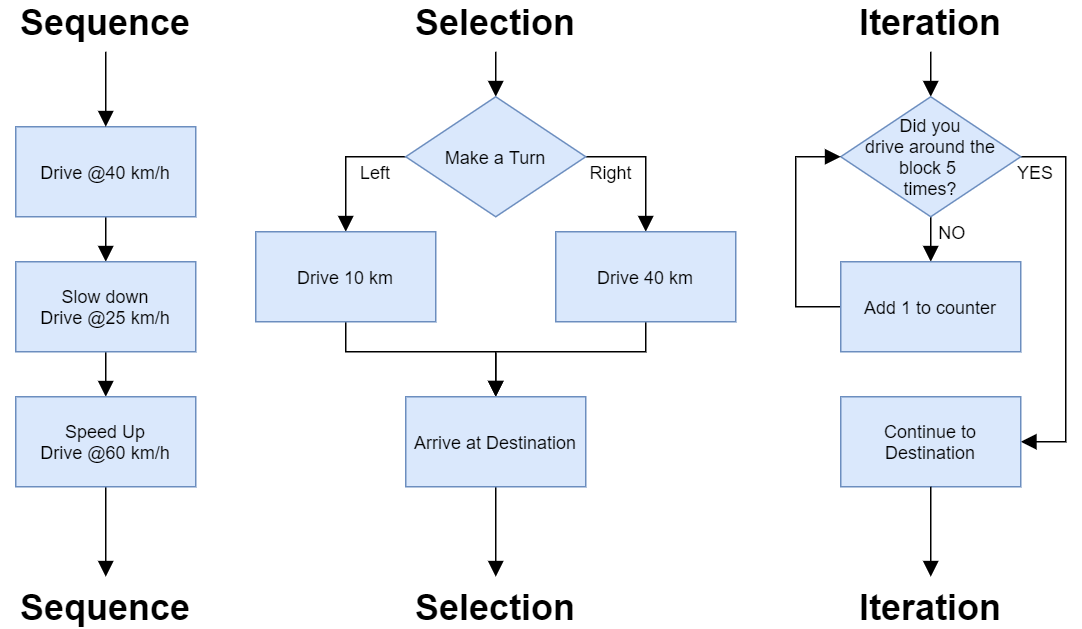
Fig. 3.1 Control structures sequence selection and iteration#
Control flow is the order in which a program runs its statements. By default Python runs statements from top to bottom; control flow statements change that order by choosing between branches, repeating a block, or jumping out of one, as the table below summarizes.
Control Flow Statements Type |
Control Flow Statement |
Description |
|---|---|---|
Conditional Statements |
if-else |
Executes a block of code if a specified condition is true, and another block if the condition is false. |
switch-case |
Evaluates a variable or expression and executes code based on matching cases. |
|
Looping Statements |
for |
Executes a block of code a specified number of times, typically iterating over a range of values. |
while |
Executes a block of code as long as a specified condition is true. |
|
do-while ( |
Executes a block of code once and then repeats the execution as long as a specified condition is true. |
|
Jump Statements |
break |
Terminates the loop or switch statement and transfers control to the statement immediately following the loop or switch. |
continue |
Skips the current iteration of a loop and continues with the next iteration. |
|
return |
Exits a function and returns a value to the caller. |
|
goto |
Transfers control to a labeled statement within the same function. (Note: goto is generally discouraged due to its potential for creating unreadable and error-prone code.) |
source: geeksforgeeks
3.1.1. if statements#
The main topic of conditionals is the if statement, which executes different code depending on the program’s state. Some topics are essential to understand before you learn conditional statements:
boolean expressions for
True/Falsedecision, andlogical operators for combining Boolean expressions.
To write useful programs, we almost always need the ability to check conditions and adjust the program’s behavior accordingly. Python uses if statements to handle conditional logic, offering several structures to control program flow:
No. |
Form |
Syntax |
|---|---|---|
1 |
Conditional execution |
|
2 |
Alternative execution |
|
3 |
Chained execution |
|
4 |
Nested conditions |
|
5 |
Match statement |
|
3.1.1.1. Conditional execution (if)#
Conditional gives us the ability to check the conditions and is the simplest form of the if statement:
We will start with the structure of if statements, then build toward else, elif, nested conditionals, and conditional expressions.
if is a Python keyword.
if statements have the same structure as function definitions: a
header followed by an indented statement or sequence of statements called a block.
The boolean expression after if is called the condition.
If it is true, the statements in the indented block run. If not, they don’t.
There is no limit to the number of statements that can appear in the block, but there has to be at least one.
Occasionally, it is useful to have a block that does nothing – usually as a place keeper for code you haven’t written yet.
In that case, you can use the pass statement, which does nothing.
x = 5

if x < 0:
    pass          # TODO: need to handle negative values!
The word TODO in a comment is a conventional reminder that there’s something you need to do later. Modern IDE’s would recognize it and act accordingly.
if x > 0:
    print('x is positive')
x is positive
if x < 0:
    pass          # TODO: need to handle negative values!
The word TODO in a comment is a conventional reminder that there’s something you need to do later. Modern IDEs would recognize it and act accordingly.
The pass statement in Python is a placeholder that does nothing when executed. It is used to keep code blocks valid where a statement is required, but no logic is needed yet. It is for creating empty functions, classes, loops, or conditional blocks.
3.1.1.2. Alternative Execution (else)#
An if statement can have a second part, called an else clause. If the condition is true, the first indented statement runs; otherwise, the second indented statement runs. For example:
num = int(input("Please enter an integer: "))

if num % 2 == 0:                ### % modulus operator
    print("num is even")
else:
    print("num is odd")
Output:
Please enter an integer:  5
num is odd
In this example, if num is even, the remainder when num is divided by 2 is 0, so the condition is True and the program displays num is even. If num is odd, the remainder is 1, so the condition is false, and the program displays num is odd.
Since the condition must be true or false, exactly one of the alternatives will run. The alternatives are called branches.
3.1.1.3. Chained Conditional (elif)#
Sometimes there are more than two possibilities, and we need more than two branches. One way to express a computation like that is a chained conditional, which includes an elif clause.
elif is an abbreviation of “else if” and is used to add multiple conditions inside an if block. There is no limit on the number of elif clauses.
If there is an else clause, it has to be at the end, but there doesn’t have to be one.
Note that:
Each condition is checked in order.
If the first is false, the next is checked, and so on.
If one of them is true, the corresponding branch runs, and the
ifstatement ends.Even if more than one condition is true, only the first true branch runs.
A good example of a chained conditional statement is:
num = int(input("Please enter an integer: "))

if num > 0:
    print("positive")
elif num == 0:
    print("neither positive or negative")
elif num < 0:
    print("negative")
else:
    print("I don't know what you are talking about.")
### Exercise: Chained Conditional
### Write a Python script that asks the user to input a numerical
### score (0-100). Based on that score, the program should print a specific message.
### Requirements:
### If the score is 90 or above, print: "Excellent! You got an A."
### If the score is between 70 and 89, print: "Good job! You passed."
### If the score is below 70, print: "Keep practicing! Try again."
### Bonus: Add a check at the very beginning. If the user enters a
### number greater than 100 or less than 0, print: "Invalid score. Please enter a value between 0 and 100."
### Your code starts here.


### Your code ends here.
Excellent! You got an A.
3.1.1.4. Nested Conditionals#
One conditional can also be nested within another. We could have written a conditional to compare two numbers:
x = 5
y = 10
print(f"x: {x}; y: {y}")

if x == y:
    print('x and y are equal')
else:
    if x < y:
        print('x is less than y')
    else:
        print('x is greater than y')
x: 5; y: 10
x is less than y
In this example, the outer if statement contains two branches:
The first branch contains a simple statement.
The second branch contains another
ifstatement with two branches of its own.
Those two branches are both simple print statements, although they could have been conditional statements as well.
Although the indentation of the statements makes the structure apparent, nested conditionals can be difficult to read. I suggest you avoid them whenever possible.
Logical operators often simplify nested conditional statements. Here’s an example with a nested conditional.
if 0 < x:
    if x < 10:
        print('x is a positive single-digit number.')
x is a positive single-digit number.
The print statement runs only if we make it past both conditionals, so we get the same effect with the and operator.
if 0 < x and x < 10:
    print('x is a positive single-digit number.')
x is a positive single-digit number.
For this kind of condition, Python provides a more concise option:
if 0 < x < 10:
    print('x is a positive single-digit number.')
x is a positive single-digit number.
### Exercise: Nested Conditional
### Create a simple login system that verifies a username and then a password.
### For this exercise, set the "correct" credentials to:
### Username: admin
### Password: password123
### Requirements:
### Ask the user to input a username.
### First Level (Username Check):
### If the username is correct ("admin"), ask for a password.
### If the username is incorrect, print: "Access Denied: User not found."
### Second Level (Password Check - Nested):
### If the password is correct ("password123"), print: "Welcome, Admin! Login successful."
### If the password is incorrect, print: "Access Denied: Incorrect password."
### Your code starts here


### Your code ends here
Welcome, Admin! Login successful.
3.1.2. Conditional Expressions#
Python has a compact way to choose between two values based on a condition. Instead of a full if/else block, you can write a conditional expression (also called the “Ternary Expression” or “Ternary Operator”):
value = A if condition else B
Read it as: “give me A if condition is true, otherwise B.”
if (condition) {
    return A;
} else {
    return B;
}return condition ? A : B;A if condition else BFor the example below, the condition will be true, and therefore “adult” will be assigned to the status variable.
age = 20
status = "adult" if age >= 18 else "minor"
#            1           2            3     ### 3 operands ("ternary")
print(status)   # "adult"
adult
You can compare with the full if statement version it replaces below. The result is the same, but the conditional expression fits on one line and reads almost like a sentence: “adult if age >= 18, else minor.”
age = 20
if age >= 18:
    status = "adult"
else:
    status = "minor"
If you think about it, ternary operation is cleaner than the full if/else statement for simple value selection.
import math

x = 5

# If/else block
if x > 0:
    y = math.log(x)
else:
    y = float('nan')
print(y)

# Equivalent conditional expression — one line
y = math.log(x) if x > 0 else float('nan')
print(y)
1.6094379124341003
1.6094379124341003
# A conditional expression can sit inside a larger expression, such as an f-string
score = 72
print(f"Result: {'pass' if score >= 60 else 'fail'}")   # Result: pass
Result: pass
### Exercise: Conditional Expressions
# 1. Write a one-liner using a conditional expression that assigns 'even'
#    or 'odd' to a variable called label, based on whether n is even.
# 2. The if/else statement below stores the absolute value of x in magnitude.
#    Rewrite it as a single assignment that uses a conditional expression.
# 3. Print label and magnitude.
n = 7
x = -4
if x >= 0:
    magnitude = x
else:
    magnitude = -x
### Your code starts here.


### Your code ends here.
odd
4