
1.1. On Programming#
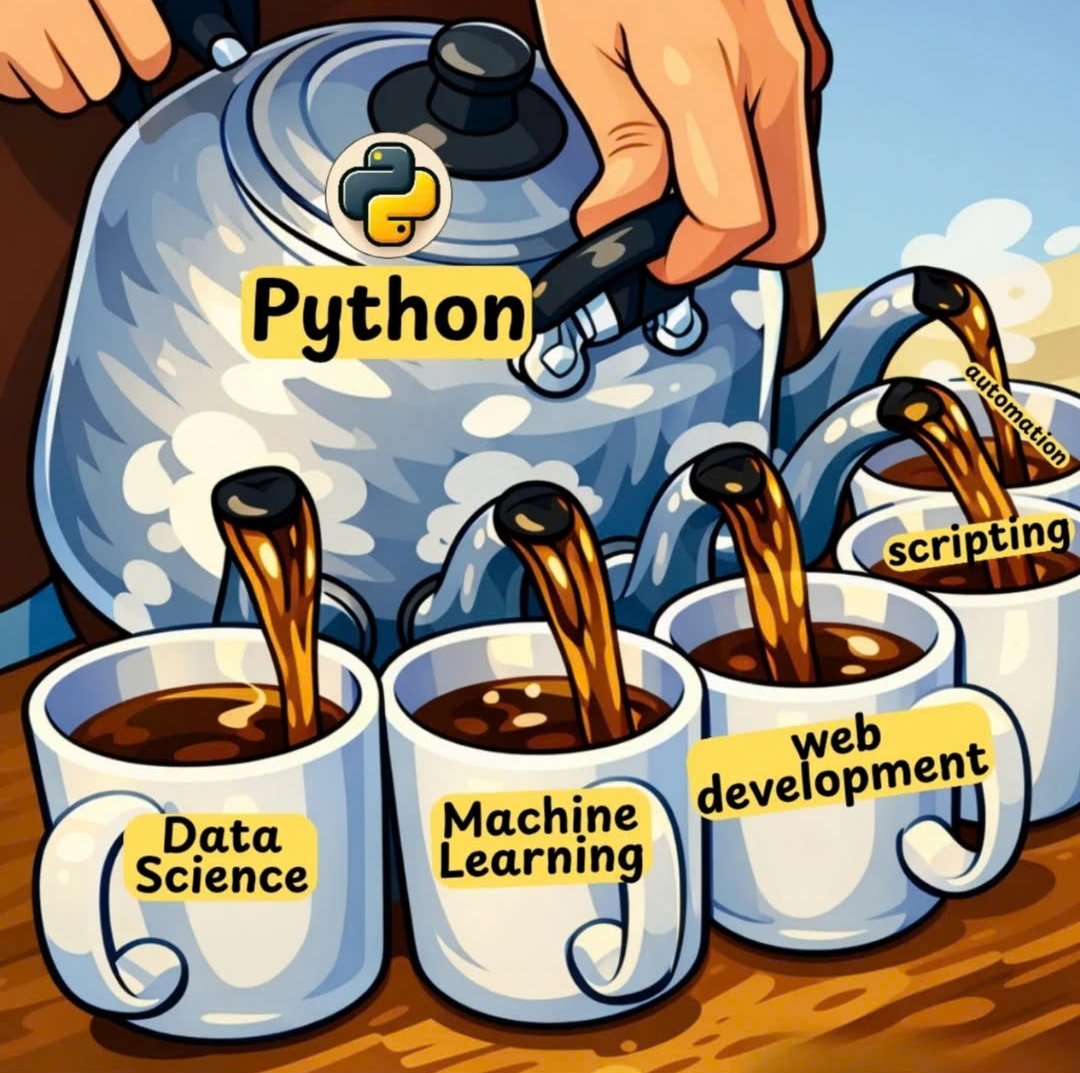
Fig. 1.1 Python is versatile#
Learning programming is largely about connecting the dots. First, you need enough concepts, examples, and practice problems to work with. Then you need to connect them so they become usable knowledge.
Two habits matter early:
Repeat: Keep collecting and revisiting the core ideas.
Associate: Keep linking new ideas to the ideas you already have.
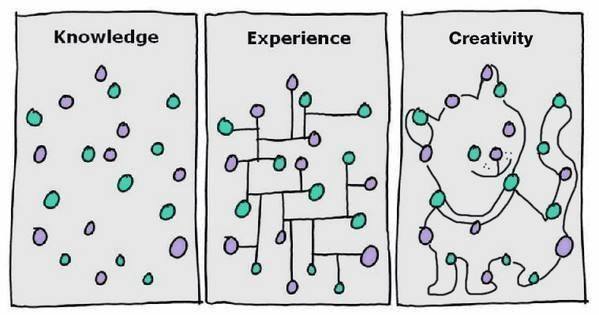
Becoming fluent in Python requires a working knowledge of several connected ideas. Some of the essential concepts include:
This chapter introduces fundamental programming concepts using Python as the teaching language. These ideas form the foundation for the programming skills you will build throughout the course:
Algorithms and Programs
Programming Language
Levels of Abstraction
Interpreted vs Compiled
Programming Constructs
Expressions and Statements
Number Systems
Resources
This chapter focuses on the constructs of programming. This vocabulary matters because you will use it to understand computational material, design solutions to computational problems, and communicate clearly with other programmers. These concepts appear in most programming languages, even when the syntax and implementation details differ. Learning them now will give you a stronger foundation for studying other languages and tackling more advanced programming problems.
1.1.1. Algorithms and Programs#
Before you write any code, you need a plan for solving the problem. An algorithm is a finite, ordered set of unambiguous steps that turns some input into the desired output. Each step must be clear enough that anyone, or any machine, following it gets the same result, and the steps must eventually come to an end.
An algorithm describes the logic of a solution, not the syntax of a particular language. You can write an algorithm in plain English, as a numbered list, or as a flowchart before you decide which programming language to use. A recipe is a familiar example: it takes ingredients as input, lists steps in a fixed order, and ends with a finished dish as output.
For example, here is an algorithm for finding the largest number in a list:
Look at the first number and remember it as the largest so far.
Look at the next number. If it is greater than the largest so far, remember it instead.
Repeat step 2 until no numbers are left.
Report the number you remembered.
Given the input [42, 17, 88, 63], the steps remember 42, keep 42 after seeing 17, switch to 88, keep 88 after seeing 63, and report 88 as the output.
A program is an algorithm written in a programming language so that a computer can execute it. The same algorithm can be implemented in Python, Java, or any other language; only the notation changes. The cell below implements the largest-number algorithm in Python. You will learn the for loop and the if statement it uses in Chapter 3. For now, notice how each line matches one of the steps above.
### the largest-number algorithm implemented in Python
numbers = [42, 17, 88, 63]

largest = numbers[0]          # step 1: remember the first number
for num in numbers[1:]:       # step 3: repeat for each remaining number
    if num > largest:         # step 2: keep the larger number
        largest = num
print(largest)                # step 4: report the result
88
Python also provides a built-in function, max(), that carries out this algorithm for you: max(numbers) returns 88. Built-in functions like max() are algorithms that other programmers have already implemented and tested, so you can reuse them instead of writing the steps yourself.
1.1.2. Programming Language#
Learning to program means learning a new way of thinking – thinking like a computer scientist. This approach combines some of the best features of mathematics, engineering, and the natural sciences. Like mathematicians, computer scientists use formal languages to denote ideas – specifically computations. Like engineers, they design things, assembling components into systems and evaluating trade-offs among alternatives. Like scientists, they observe the behavior of complex systems, form hypotheses, and test predictions.
1.1.2.1. Natural vs Formal Languages#
Natural languages are the languages that people use to communicate, such as English, Spanish, and French. They were not designed by people; they evolved naturally. Formal languages are languages that are designed by people for specific applications. For example, the notation that mathematicians use is a formal language that is particularly good at denoting relationships among numbers and symbols. Similarly, programming languages are formal languages designed to express computations. Although formal and natural languages have some features in common, there are important differences:
Ambiguity: Natural languages are full of ambiguity, which people deal with by using contextual clues and other information. Formal languages are designed to be nearly or completely unambiguous, which means that any program has exactly one meaning, regardless of context.
Redundancy: In order to make up for ambiguity and reduce misunderstandings, natural languages use redundancy. As a result, they are often verbose. Formal languages are less redundant and more concise.
Literalness: Natural languages are full of idiom and metaphor. Formal languages mean exactly what they say.
Because we all grow up speaking natural languages, it is sometimes hard to adjust to formal languages. Formal languages are denser than natural languages, so it takes longer to read them. Additionally, the structure is important, so it is not always best to read from top to bottom or left to right. Finally, the details matter. Small errors in spelling and punctuation, which you can get away with in natural languages, can make a big difference in a formal language.
1.1.3. Levels of Abstraction#
Programming languages exist on a spectrum, ranging from those closest to hardware (machine code) to those closest to high-level languages that are more human-readable, as shown below:
Level |
Description |
Examples |
Code Example |
|---|---|---|---|
High-Level Languages |
Closest to human language, abstracted from hardware details |
Python, Java, JavaScript, C, C++ |
|
Low-Level Languages |
Closer to machine code, direct hardware manipulation |
Assembly language |
|
Machine Code |
Binary instructions directly executed by CPU |
Binary (0s and 1s) |
|
1.1.4. Interpreted vs. Compiled#
Programming languages also differ in how they are executed. Interpreted languages such as Python, JavaScript, and Ruby are commonly run by an interpreter, which translates and executes code at runtime. Compiled languages such as C, C++, and Rust usually require a compilation step that translates source code into machine code before execution, which can improve runtime performance. Many modern languages use a hybrid approach: source code is compiled to intermediate bytecode, then interpreted or just-in-time compiled by a virtual machine.
1.1.5. Programming Constructs#
A computer program is a set of instructions written in the notation of a programming language. Although programs can become complex, most programming languages rely on a small set of core control structures:
Sequence: instructions are executed one after another (sequential execution).
Selection: decision-making/control structure; namely, choosing between alternative paths of actions within a program.
Iteration: code repetition; either count-controlled or condition-controlled.
Programming languages also provide supporting elements such as:
Subroutine: blocks of code (function/method) in a modular program performing a particular task.
Nesting: Selection and iteration constructs can be nested within each other.
Variable: a named computer memory location that stores values
Data type (Type): a classification of data values specifying the values and operations on the values.
Operator: symbols that perform operations on one or more operands.
Array: storing multiple values of the same data type in a single variable, aka, data collections.
1.1.6. Expressions and Statements#
In programming languages, expressions and statements are fundamental building blocks for formulating and using the language.
By definition, an expression is a combination of values, variables, operators, and function calls that the Python interpreter can evaluate to produce a single value, which may be assigned to a variable for later use. Note that a single literal value, like an integer or string, can be an expression.
An expression may contain operators and operands, such as a + b * c, as shown below.
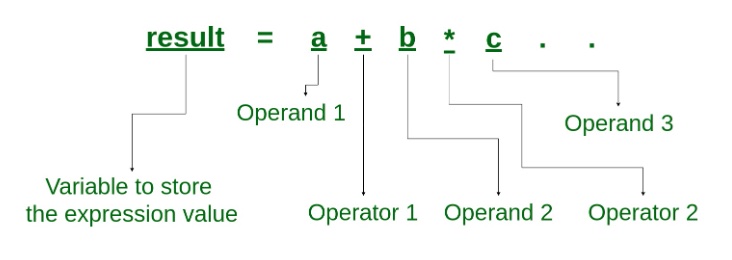
Fig. 1.3 Expression, Operand, and Operator#
For example, we can create a variable and it will an expression by itself.
message = 'And now for something completely different'
A variable can be an expression, so we can display the value of message by asking Python to evaluate it to see the value:
message
'And now for something completely different'
A statement is a complete instruction for the interpreter to execute. A statement performs an action or controls the flow of a program, but it does not produce a value that can be used elsewhere like an expression. For example, an assignment statement creates a variable and gives it a value, but the statement itself has no value.
Computing the value of an expression is called evaluation; running a statement is called execution. A statement performs an action, while an expression computes a value. For example:
Type |
Example |
Description |
|---|---|---|
Statement |
|
Assignment statement: Assigns 5 to |
|
Print statement: Prints something to the screen (has an effect); no value. |
|
|
|
|
|
Imports the |
|
Expression |
|
Produces the value |
|
Computes a value based on |
|
|
Evaluates to |
x = 5                # statement: assigns a value; nothing is displayed
x + 5                # expression: evaluates to 10, so the REPL/notebook shows 10
if x > 0:            # statement: controls flow; no value, only the side effect below
    print("x is positive")   # a block of code that executes if the condition is true
x is positive
1.1.7. Number Systems#
Advanced Topic
This section covers number systems (binary, octal, hexadecimal), which are more advanced. They are useful for understanding how computers work at a lower level, but they are not essential for writing most Python programs. Feel free to skim this section on first reading and return to it later when you need to work with different number bases.
In programming, number systems are ways of representing numbers using different bases. Computers store and process data in binary, but programmers often use other bases for convenience, readability, or hardware interaction. The four main number systems used in programming are binary (base-2), decimal (base-10), hexadecimal (base-16), and octal (base-8):
System |
Base |
Digits Used |
Typical Use |
Python Example (all = 100) |
|---|---|---|---|---|
Binary |
2 |
0–1 |
Hardware, CPU, memory, bitwise operations |
|
Octal |
8 |
0–7 |
Unix file permissions |
|
Decimal |
10 |
0–9 |
Human-friendly math, user input/output |
|
Hexadecimal |
16 |
0–9, A–F |
Memory addresses, colors, debugging, networking |
|
As you can see, binary literals start with 0b, octal literals start with 0o, and hexadecimal literals start with 0x.
All number systems use positional notation, where each digit’s value depends on its position and the number system’s base. For example, the decimal number 345, or 345 (base 10), can be represented as shown in the table below. Each digit represents a different power of the base and contributes a corresponding value.
digit |
position |
digit x base^position |
expanded |
value |
|---|---|---|---|---|
3 |
2 |
3 × 10^2 |
3 × 100 |
300 |
4 |
1 |
4 × 10^1 |
4 × 10 |
40 |
5 |
0 |
5 × 10^0 |
5 × 1 |
5 |
345 |
Here, the digit 3 means 300 because it is in the hundreds place (10^2). Therefore:
digit value = digit x (base ^ position)
You then add all the digit values together to get the value of the number:
345 = 3×10² + 4×10¹ + 5×10⁰
Following the same process of adding up the digit values, we can convert 1011 (base 2) to decimal like this:
Digit |
Position |
2 to the nth Power |
Value |
|---|---|---|---|
1 |
3 |
2³ |
8 |
0 |
2 |
2² |
0 |
1 |
1 |
2¹ |
2 |
1 |
0 |
2⁰ |
1 |
11 |
So, we can do base conversion from base 2 to base 10 by adding the place values:
1011₂ = 1x2^3 + 0 x 2^2 + 1 x 2^1 + 1 x 2^0 = 8 + 2 + 1 = 11₁₀
Another way is to put the place values at the top:
Position |
2^3 |
2^2 |
2^1 |
2^0 |
|
|---|---|---|---|---|---|
Place value |
8 |
4 |
2 |
1 |
|
Digit |
1 |
0 |
1 |
1 |
|
Calculation |
1×8 |
0×4 |
1×2 |
1×1 |
|
Value |
8 |
0 |
2 |
1 |
11 |
The base 2 system, or binary, is foundational in computing. To count from 0 to 5 (base 10) in binary:
0 = 0b0000
1 = 0b0001
2 = 0b0010
3 = 0b0011
4 = 0b0100
5 = 0b0101
To see visually that 100 (base 10) is equal to 1100100 (base 2) (or 0b1100100, where b stands for binary):
0b1100100
  ││││││└ 0 × 2^0 = 0 × 1  = 0
  │││││└─ 0 × 2^1 = 0 × 2  = 0
  ││││└── 1 x 2^2 = 1 × 4  = 4
  │││└─── 0 × 2^3 = 0 × 8  = 0
  ││└──── 0 × 2^4 = 0 × 16 = 0
  │└───── 1 × 2^5 = 1 × 32 = 32
  └────── 1 × 2^6 = 1 × 64 = 64
                             __
                             100
Python has built-in functions bin(), oct(), hex(), and int() for converting between number systems. Python represents binary, octal, and hexadecimal literals with the prefixes 0b, 0o, and 0x. When using int() for conversion, you provide the base of the input string. Python also recognizes these literal prefixes and automatically evaluates the values in base 10.
num_b = bin(100)            # '0b1100100'
num_o = oct(100)            # '0o144'
num_h = hex(100)            # '0x64', converted from 100
num_h2 = hex(0b1100100)     # '0x64', converted from base 2
num_i_h = int(num_h, 16)    # '100'
num_i_b = int(num_b, 2)     # '100'

print(num_b, num_o, num_h, num_h2, num_i_h, num_i_b, sep="\n")
0b1100100
0o144
0x64
0x64
100
100
### Exercise: Number System Conversions
# Q1. What's the value of 10 (base 10) in binary? (Print it as a string if you use it as a literal)
# Q2. What's the value of decimal 64 in base 16?
# Try to produce the same output as the cell below. # You may need to use the print() function.
### Your code starts here


### Your code stops here
0b1010
0x40
1.1.7.1. Character Encoding#
For computers, the smallest unit of data is a bit (binary digit). A bit can only be 0 or 1, which can represent states such as off/on, false/true, or no voltage/voltage. A byte is a group of 8 bits. Because 8 bits can represent 2^8, or 256, different values (0-255), the byte is the fundamental addressable unit in modern computing.
Computers process machine code, so text needs to be represented numerically. That representation is called encoding. For example, the letter A is represented as 65 (base 10), or 0b1000001, in the ASCII (American Standard Code for Information Interchange) code table. ASCII encoding covers English letters, numbers, and common special characters. An early version of the ASCII table is MIL-STD-188-100:
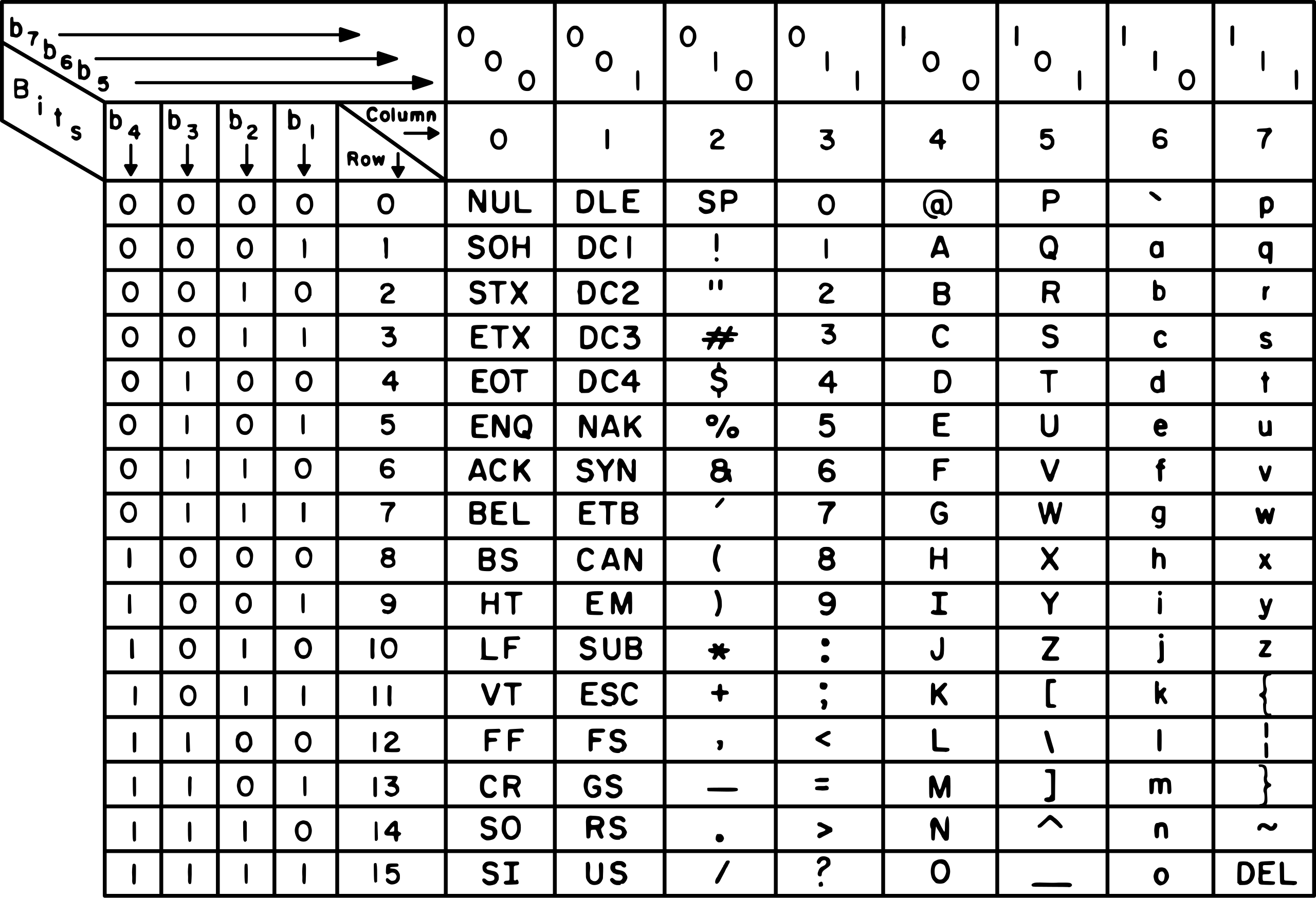
Fig. 1.4 ASCII Code Chart 1972#
In this chart, you can see that the letter A has the binary value 1000001. When comparing string or character literals, we can say that 'B' is greater than 'A' because of the encoding: the ASCII value of 'B' is 66, which is greater than the ASCII value of 'A', 65.
Since ASCII only represents a limited set of English characters, the Unicode Standard and Unicode Transformation Format (UTF) schemes were developed to support text from the world’s writing systems. Among these schemes, UTF-8 is the dominant encoding system on the internet and is supported by all modern operating systems and programming languages.
ASCII uses 1 byte (7 bits originally and 8 bits for extended ASCII) to represent each character for its standard 128 characters, while UTF-8 is variable-length, using 1 to 4 byte code units (8 to 32 bits) to support 1,112,064 code points, while also encoding standard ASCII characters in just 1 byte for backwards-compatibility. With the large number of code points supported, UTF-8 is able to represent emojis and East Asian language characters.
1.1.7.1.1. Character Codes in Python#
You do not need to look up character codes in a table; Python can do it for you. The built-in function ord() takes a single character and returns its code point, the integer that represents it in Unicode. For the characters in the ASCII table, the code point is the same as the ASCII code. The built-in function chr() does the reverse: it takes an integer code and returns the character.
Function |
Input |
Output |
Example |
|---|---|---|---|
|
a one-character string |
an integer code |
|
|
an integer code |
a one-character string |
|
Combined with bin() and hex() from the previous section, ord() lets you see the same character as a decimal, binary, or hexadecimal number.
### character to code and back
code = ord('A')
print(code)              # 65
print(bin(code))         # 0b1000001
print(hex(code))         # 0x41
print(chr(code))         # A

### why 'B' > 'A' is True: Python compares the codes
print(ord('B') - ord('A'))   # 1
print('B' > 'A')             # True

### beyond ASCII: Unicode code points
print(ord('é'))          # 233
print(chr(960))          # π
65
0b1000001
0x41
A
1
True
233
π
### Exercise: Character Codes
### What's the decimal code for the letter "C" in the ASCII code? Save it to a variable named c_dec using the ord() function.
### What's the binary code for the letter "C" in the ASCII code? Save it to a variable named c_bin using the bin() function.
### Use print() with a comma between the label and the value to produce these two lines:
### Decimal code for C: 67
### Binary code for C: 0b1000011
### Your code starts here


### Your code stops here
Decimal code for C: 67
Binary code for C: 0b1000011
1.1.8. Resources#
Official Python Documentation
Python Package Index (PyPI) - Repository of third-party Python packages
Style Guides and Best Practices
Google Python Style Guide - Industry-standard style guide used at Google; differs from PEP8 in places such as forbidding wildcard imports (from X import *) and more structured docstrings for functions/methods.
Tutorials
Real Python - Tutorials and articles on Python programming
Python for Everybody - Free interactive textbook and course
Automate the Boring Stuff with Python - Practical programming for beginners
Interactive Practice
Python Tutor - Visualize code execution step by step
LeetCode - Coding practice and interview preparation
HackerRank Python - Practice problems and challenges