

2.1. Variables#
A variable is a named location in computer memory that stores a value. Think of it as a name/label that is associated with some data. Variables are fundamental to programming because they allow us to store, retrieve, and manipulate data throughout our program.
Unlike some other programming languages, Python doesn’t require you to declare the data type of a variable before using it. The type is automatically determined based on the value you assign (this is called dynamic typing).
2.1.1. Naming Rules & Conventions#
General Python variable naming follows the convention from the official PEP 8 style guidelines, although conventions such as Google Python:
Length: Names can be as long as you like.
Containing: Names can contain alphanumeric characters (letters and numbers) and underscores. Special characters (e.g., @, #, $) are not allowed.
Names must start with a letter (a-z, A-Z) or underscore (
_)Case-sensitive:
Name,name, andNAMEare different variablesAvoid keywords and built-in function names (like
if,for,class, etc.) for naming variables.Constants: For constants, use ALL_CAPS with underscores; e.g., MAX_SIZE = 100, PI = 3.14159.
The only punctuation that can appear in a variable name is the underscore character,
_. It is often used in names with multiple words, such asyour_nameorairspeed_of_unladen_swallow.
If you give a variable an illegal name, you get a syntax error. For example, the name million! is illegal because it contains punctuation.
Python programmers follow these conventions (recommended but not required):
Convention |
Use Case |
Example |
|---|---|---|
snake_case |
Variable and function names |
|
UPPER_CASE |
Constants |
|
PascalCase (not camelCase) |
Class names |
|
Descriptive names |
Make code readable |
|
2.1.2. Creating Variables#
In Python, you create a variable by using an assignment statement with the assignment operator =. The syntax for creating variables is:
variable_name = value
An assignment statement has three parts:
the name of the variable on the left,
the equals operator,
=, andan expression on the right.
For example, we can create variables as follows.
x = 1
age = 20
name = "Alice"
pi = 3.14
is_active = True
Note that:
A variable is a name that refers to a value.
When you run an assignment statement, there is no output. Python creates the variable and gives it a value, but the assignment statement has no visible effect.
A literal value is also an expression.
After creating a variable, you can use it as an expression.
Variables can be reassigned.
You can assign multiple values/expressions to multiple variables in one line.
You can reassign a variable and the last value assigned is the one that stays.
x = 10         # x is 10
x = 20.5       # now x is 20.5
x = "hello"    # now x is a string (type can change!)
print(x)
hello
You can assign multiple values/expressions to multiple variables in one line. For example:
assign multiple variables the same value
assign multiple variables different values
x = y = z = 0           # x, y, and z are all 0
a, b, c = 10, 20, 30    # assign different values to variables

print(f"x = {x}, y = {y}, z = {z}")
print(f"a = {a}, b = {b}, c = {c}")
x = 0, y = 0, z = 0
a = 10, b = 20, c = 30
Or, you can swap variable values by switch the positions of variables.
m, n = 5, 10            # m is 5 and n is 10
print(f"Before swap:\t m = {m}, n = {n}")

m, n = n, m             # Swap values using tuple unpacking ==> sorting
print(f"After swap:\t m = {m}, n = {n}")
Before swap:	 m = 5, n = 10
After swap:	 m = 10, n = 5
In the following examples, the values/expressions have different data types:
a floating-point number
an expression (
pi * 2)a string
pi = 3.141592653589793
pi2 = pi * 2
message = 'And now for something completely different'
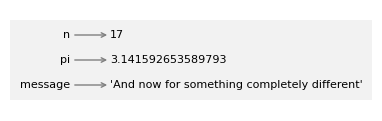
A common way to represent variables is to write the name with an arrow pointing to its value. This kind of figure is called a state diagram because it shows what state each of the variables is in (think of it as the variable’s state of mind). We’ll use state diagrams throughout the book to represent a model of how Python stores variables and their values.
### code for displaying state diagrams
### dont' worry about the code here

import math

from shared.diagram import make_binding, Frame

binding = make_binding("message", 'And now for something completely different')
binding2 = make_binding("n", 17)
binding3 = make_binding("pi", 3.141592653589793)

frame = Frame([binding2, binding3, binding])
### code for displaying state diagrams
### dont' worry about the code here

from shared.diagram import diagram, adjust

width, height, x, y = [3.62, 1.01, 0.6, 0.76]
ax = diagram(width, height)
bbox = frame.draw(ax, x, y, dy=-0.25)
adjust(x, y, bbox);
You can also use a variable as part of an expression with operators.
print(pi + 1)
print(2 * pi)
4.141592653589793
6.283185307179586
And you can use a variable when you call a function.
round(pi)       ### "round()" is a built-in function
len(message)    ### the number of characters in the string
42
### Exercise: Create a variable called "name" and use f-string to print it
### The output should be the same as the cell below
### Your code starts here


### Your code ends here
Hello, Dr. Chen
2.1.3. Python Keywords#
Python reserved words, or keywords, are words that you are not supposed to use for variable names.
Keywords are special words reserved by the programming language to be used to specify the structure of a program. Keywords of the language cannot be used as ordinary identifiers. For example, if you try to assign a string to a variable name class, since class is a keyword, you will receive a syntax error because the Python interpreter will detect that.
num = 5
if num > 0:
    print("Positive number")
Positive number
2.1.4. Soft keywords#
Python’s soft keywords are special words that act as keywords only within specific contexts, but can be used as regular identifiers (like variable or function names) in other contexts. As of Python 3.12, there are 4 soft keywords: match, case, _, and type.
2.1.5. Python Objects#
In Python, everything is an object, including classes, instances of classes, modules, and functions. In short, anything that you can point a variable to is an object. Variables in Python do not save values as buckets containing things; they’re pointers pointing to objects.
In Python, everything is an object, and every object has:
identity (unique ID) (
id()): Each object has a unique identifier that remains constant for the object’s lifetime. This is the object’s memory address and can be retrieved using the built-in id() function.value: This represents the data that the object stores. For some object types (such as integers, strings, or tuples), the value is immutable (cannot be changed after creation), whereas for others (such as lists or dictionaries), it is mutable (can be changed).
type (
type()): An object’s type defines what kind of data it represents and what operations can be performed on it. The type of an object can be determined using the built-in type() function, and every object is an instance of some class.
2.1.6. Object ID#
In Python, every object has a unique identity, which can be obtained using the built-in id() function. An identity is a unique integer that remains constant for an object throughout its lifetime.
This is useful for understanding how Python manages objects in memory and for distinguishing between objects that have the same value. Note these objects have different id’s.
2.1.6.1. id()#
We use the id() function to check the object’s id. As you see, id’s are unique here.
num1 = 10                   ### integer
num2 = 10.1                 ### floating-point number
greeting = "hello, world"   ### text/string
fruits = ['Apple', 'Banana', 'Cherry']      ### lists are enclosed with square brackets

print(id(num1))
print(id(num2))
print(id(greeting))
print(id(fruits))
4347928864
4577185808
4579318768
4579237440
The example below is peculiar. If two variables point to the same literal values, then they have the same id, even though they are created separately.
num1 = 100
num2 = 100
string1 = "hello"
string2 = "hello"

print(id(num1))
print(id(num2))
print(id(string1))
print(id(string2))
4347931744
4347931744
4460037296
4460037296
However, if the collections are assigned separately, they do not share the same id.
nums1 = [1, 2, 3, 4, 5 ]
nums2 = [1, 2, 3, 4, 5 ]

print(id(nums1))
print(id(nums2))
4579240960
4579240640
2.1.6.2. Aliasing#
In the example below, num1 and num2 point to the same object, and they therefore have the same id. num2 is an alias of num1.
num1 = 10            ### integer
num2 = num1          ### num2 now references the same object as num1

print(f"num1 id: {id(num1)}")
print(f"num2 id: {id(num2)}")
num1 id: 4347928864
num2 id: 4347928864
Instead of literals, let us observe the collection type objects. We see that, just like strings, nums1 and its alias share the same id and the same value.
nums1 = [1, 2, 3, 4, 5 ]    ### lists are enclosed with square brackets
nums2 = nums1

print(f"nums1:\t\t id: {id(nums1)} values: {nums1}")
print(f"nums2:\t\t id: {id(nums2)} values: {nums2}")
nums1:		 id: 4576753472 values: [1, 2, 3, 4, 5]
nums2:		 id: 4576753472 values: [1, 2, 3, 4, 5]
To understand these behavior between the variable names and the objects in memory, we can look at the them as two separate zones.
At first, two variables (nums1, nums2) are created, one with assignment and the other with aliasing, and now their share the same object references.
        %%{init: {'theme':'base', 'themeVariables': { 'fontSize':'10px'}}}%%
flowchart LR

  %% -----------------------
  %% Variable Land
  %% -----------------------
  subgraph VL["Variable Land"]
    nums1["nums1"]
    nums2["nums2"]
  end

  %% -----------------------
  %% Object Land
  %% -----------------------
  subgraph OL["Object Land"]
    list1["list[1, 2, 3, 4, 5]"]
  end

  %% -----------------------
  %% References
  %% -----------------------
  nums1 --> list1
  nums2 --> list1
When we update the values of the nums2, we see that nums1 is changed as well.
nums2[4] = 5000

print(id(nums1), nums1)
print(id(nums2), nums2)
4576753472 [1, 2, 3, 4, 5000]
4576753472 [1, 2, 3, 4, 5000]
That is because both nums1 and nums2 are still pointing to the same object.
        %%{init: {'theme':'base', 'themeVariables': { 'fontSize':'10px'}}}%%
flowchart LR

  %% -----------------------
  %% Variable Land
  %% -----------------------
  subgraph VL["Variable Land"]
    nums1["nums1"]
    nums2["nums2"]
  end

  %% -----------------------
  %% Object Land
  %% -----------------------
  subgraph OL["Object Land"]
    list1["list[1, 2, 3, 4, 5000]"]
  end

  %% -----------------------
  %% References
  %% -----------------------
  nums1 --> list1
  nums2 --> list1
However, if we reassign (assignment) the nums2 instead of updating (aliasing), we see that nums2 now points to a different object (id), even though we assign the same values.
nums2 = [1, 2, 3, 4, 5000]

print(id(nums1), nums1)
print(id(nums2), nums2)
4576753472 [1, 2, 3, 4, 5000]
4579241920 [1, 2, 3, 4, 5000]
Because assignments with container types create new object even though they have the same values. This is unlike the case with creating literal value variables.
        %%{init: {'theme':'base', 'themeVariables': { 'fontSize':'10px'}}}%%
flowchart LR
  subgraph VL["Variable Land"]
    nums1["nums1"]
    nums2["nums2"]
  end

  subgraph OL["Object Land"]
    list1["list[1, 2, 3, 4, 5000]"]
    list2["list[1, 2, 3, 4, 5000]"]
  end

  nums1 --> list1
  nums2 --> list2
2.1.7. Sameness#
Equality Operators:
==and!=. These check if two values are equal (have the same content).Identity Operator:
is. This checks if two variables point to the same object in memory (aliasing!).
# Value equality

x = [1, 2, 3]
y = [1, 2, 3]
print(x == y)              # True (same content)
print(x != y)              # False

# String equality
name1 = "Chen"
name2 = "Chen"
print(name1 == name2)      # True
True
False
True
### is: identity
x = [1, 2, 3]
y = [1, 2, 3]
print(x == y)              # True (equal values)
print(x is y)              # False (different objects)

# Aliasing - same object
x = [1, 2, 3]
y = x                      # Alias!
print(x == y)              # True (equal values)
print(x is y)              # True (same object)
True
False
True
True
As a summary of the operators:
Operator |
Purpose |
Example |
What it checks |
|---|---|---|---|
|
Equality |
|
Do they have the same content? |
|
Inequality |
|
Do they have different content? |
|
Identity |
|
Do they point to the same object? |
|
Non-identity |
|
Do they point to different objects? |
Or, simply:
Operator |
Checks |
Meaning |
|---|---|---|
|
Identity |
Same object |
|
Equality |
Same value |