

5. Lists#
This chapter presents one of Python’s most useful built-in types, lists. You will also learn more about objects and what can happen when multiple variables refer to the same object.
5.1. Learning Objectives#
By the end of this chapter, you should be able to:
Construct and manipulate Python lists using indexing, slicing (including advanced step slices), and core list methods.
Explain and reason about object identity, aliasing, shallow vs. deep copies, and how lists behave when passed to functions.
Use lists idiomatically in Python: list comprehensions, unpacking and starred expressions,
enumerate(),zip(), and basic sorting/looping patterns.
5.2. Introduction to Lists#
5.2.1. What is a List?#
If you’re familiar with other programming languages, Python lists are similar to arrays in languages like Java, C++, or JavaScript. However, Python lists are more flexible: they can grow or shrink dynamically and can contain mixed data types.
A Python list is a sequence data type, like strings and tuples. Sequences are:
ordered collections that support
indexing,
slicing,
len(),inmembership testing, anditeration.
The key distinction is mutability and heterogeneous element data types:
In a string, the values are characters; in a list, they can be any type. The value literals in a list are called elements.
Lists are mutable, meaning they can be modified after creation.
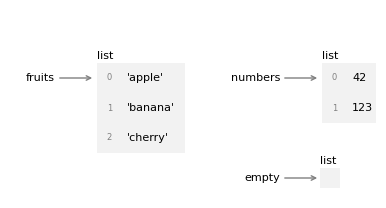
The following figure shows the state diagram for fruits, numbers and empty. Lists are objects in Python’s memory. When you create a list, Python creates a list object that holds your data in a specific order, and the variable holds a reference to that object.
numbers = [42, 123]
fruits = ['apple', 'banana', 'cherry']
empty = []
5.3. Creating Lists#
There are several ways to create a new list:
Square brackets
[]: Enclose elements in square brackets (a subscription expression) to create a list literallist()constructor: Convert any iterable (strings, ranges, tuples, etc.) into a listList comprehension: Create lists using a concise expression-based syntax
split()method: Convert a string into a list of words or partsNested lists: Create lists containing other lists as elements
5.3.1. Basic List Creation#
The most common way to create a list is by enclosing comma-separated values in square brackets [].
Syntax:
list_name = [element1, element2, element3, ...]
The elements can be of any type, and you can mix different types in the same list.
### Using square brackets - sequences of items

numbers = [1, 2, 3, 4, 5]               ### a list of integers
fruits = ['apple', 'banana', 'cherry']  ### a list of strings
empty = []                              ### an empty list

print(fruits)
print(numbers)
print(empty)
['apple', 'banana', 'cherry']
[1, 2, 3, 4, 5]
[]
### EXERCISE: Create Different Types of Lists
# Create the following lists:
# 1. A list called 'colors' with three color names
# 2. An empty list called 'empty_list'
# 3. A list called 'mixed' with a string, an integer, and a float
### Your code starts here:


### Your code ends here.
Colors: ['red', 'blue', 'green']
Empty list: []
Mixed list: ['hello', 42, 3.14]
5.3.2. list() Constructor#
The list() constructor converts any iterable (strings, ranges, tuples, etc.) into a list. This is useful when you need to convert data from one sequence type to another.
chars = list('spam')            ### a list of characters
nums = list(range(5))           ### a list of numbers from 0 to 4
tuple_data = (1, 2, 3)
list_data = list(tuple_data)    ### a list created from a tuple

print(chars)
print(nums)
print(list_data)
['s', 'p', 'a', 'm']
[0, 1, 2, 3, 4]
[1, 2, 3]
### EXERCISE: Convert Using list() Constructor
# 1. Convert the string "Python" into a list of characters
# 2. Create a list of numbers from 10 to 14 using range() and list()
### Your code starts here:


### Your code ends here.
Characters: ['P', 'y', 't', 'h', 'o', 'n']
Numbers: [10, 11, 12, 13, 14]
5.3.3. List Comprehension#
List comprehension provides a concise way to create lists based on existing sequences or ranges. It’s a powerful and Pythonic approach that often replaces traditional loops. They’re a more Pythonic alternative to using for loops to build lists.
Basic Syntax:
[expression for item in iterable]
With Condition:
[expression for item in iterable if condition]
# Traditional way
squares = []
for x in range(5):
    squares.append(x**2)
print("Traditional:", squares)

# List comprehension way
squares = [x**2 for x in range(5)]
print("Comprehension:", squares)

# With condition
even_squares = [x**2 for x in range(10) if x % 2 == 0]
print("Even squares:", even_squares)
Traditional: [0, 1, 4, 9, 16]
Comprehension: [0, 1, 4, 9, 16]
Even squares: [0, 4, 16, 36, 64]
# More complex list comprehensions
words = ['hello', 'world', 'python', 'programming']

# Get lengths of words
lengths = [len(word) for word in words]
print("Word lengths:", lengths)

# Get uppercase words longer than 5 characters
long_words = [word.upper() for word in words if len(word) > 5]
print("Long words:", long_words)

# Nested comprehension - flatten a 2D list
matrix = [[1, 2, 3], [4, 5, 6], [7, 8, 9]]
flattened = [item for row in matrix for item in row]
print("Flattened:", flattened)
Word lengths: [5, 5, 6, 11]
Long words: ['PYTHON', 'PROGRAMMING']
Flattened: [1, 2, 3, 4, 5, 6, 7, 8, 9]
### EXERCISE: convert string to uppercase using list comprehension
### Hint: use str.upper() method
### Your code starts here:


### Your code ends here.
['HELLO', 'WORLD', 'PYTHON']
### EXERCISE: Filter list using list comprehension:
### Create a new list with only words longer than 5 characters
### Hint: use len() function
### Your code starts here:
words = ['apple', 'banana', 'cherry', 'date', 'elderberry']


### Your code ends here.
['banana', 'cherry', 'elderberry']
### EXERCISE: List Comprehension Practice
# 1. Create a list of cubes (x^3) for numbers 1 through 5
# 2. Create a list of only odd numbers from 1 to 20
### Your code starts here:


### Your code ends here.
Cubes: [1, 8, 27, 64, 125]
Odd numbers: [1, 3, 5, 7, 9, 11, 13, 15, 17, 19]
5.3.4. Lists and Strings#
This section explores common patterns for working with strings and lists, focusing on converting between them and manipulating them together.
A string is a sequence of characters and a list is a sequence of values, but a list of characters is not the same as a string. To convert a string to a list of individual characters, use the list() function (covered earlier). To break a string into words or parts, use the split() method shown below.
5.3.4.1. split() Method#
The split() method breaks a string into a list of words or parts based on a delimiter. By default, it splits on whitespace.
# Split by whitespace (default)
words = 'hello world python'.split()
print(words)

# Split by custom delimiter
data = 'apple,banana,cherry'.split(',')
print(data)
['hello', 'world', 'python']
['apple', 'banana', 'cherry']
You can also use an optional delimiter argument to specify which characters to use as word boundaries:
s = 'ex-parrot'
t = s.split('-')
print(t)  # ['ex', 'parrot']
['ex', 'parrot']
5.3.4.2. join() Method#
If you have a list of strings, you can concatenate them into a single string using join(). Note that join() is a string method, so you invoke it on the delimiter and pass the list as an argument.
delimiter = ' '
t = ['pining', 'for', 'the', 'fjords']
s = delimiter.join(t)
s
'pining for the fjords'
In this case the delimiter is a space character, so join puts a space
between words.
To join strings without spaces, you can use the empty string, '', as a delimiter.
### EXERCISE: Using split() and join()
# 1. Split the sentence "Python is an amazing language" into a list of words
# 2. Split the string "2026-02-16" by the delimiter "-"
# 3. Take the sentence "Python programming is fun",
#    split it,
#    reverse the list, and
#    join back with " - "
### Your code starts here:


### Your code ends here.
1. Words: ['Python', 'is', 'an', 'amazing', 'language']
2. Date parts: ['2026', '02', '16']
3. Reversed and joined: fun - is - programming - Python
5.3.5. Nested Lists#
Although a list can contain another list, the nested list still counts as a single element.
The elements of a list don’t have to be the same data type.
The following lists contain a string, a float, an integer, and another list (nested). We see that the length of the list mixed_list is 4, although it looks having more than 4 elements, but the 4th element is a list and counted only as 1 element.
numbers = [1, 2, 3, 4, 5]
mixed_list = ['spam', 2.0, 5, numbers ]

print(mixed_list)
print(f"There are {len(mixed_list)} elements in the mixed list.")
['spam', 2.0, 5, [1, 2, 3, 4, 5]]
There are 4 elements in the mixed list.
nested_list = [
               [1, 2],
               [3, 4],
               [5, 6]
               ]
print(nested_list)
print(f"The nested list has {len(nested_list)} elements and they are lists themselves.")
[[1, 2], [3, 4], [5, 6]]
The nested list has 3 elements and they are lists themselves.
### EXERCISE: Working with Nested Lists
matrix = [[1, 2, 3], [4, 5, 6], [7, 8, 9]]
# 1. Access the second row (index 1)
# 2. Access the element in the first row, third column (value should be 3)
# 3. Calculate the total number of elements (not rows) using len()
### Your code starts here:


### Your code ends here.
Second row: [4, 5, 6]
Element at [0][2]: 3
Total elements: 9
5.4. Accessing List Elements#
Now that we know how to create lists, let’s learn how to access and extract data from them. Python provides several ways to retrieve elements from a list.
Understanding List Indices Lists in Python use zero-based indexing, meaning the first element is at position
0, the second at position1, and so on. You can think of the index as the offset from the beginning of the list.List Index Properties List indices work the same way as string indices:
Any integer expression can be used as an index.
If you try to read or write an element that does not exist, you get an
IndexError.If an index has a negative value, it counts backward from the end of the list, starting with
-1.
Below, we look at indexing (accessing a single element) and slicing (accessing a sublist) separately.
5.4.1. Indexing#
Indexing reads or writes a single element of a list using the bracket operator.
Syntax:
lst[index]Indices are 0-based: the first element is at index
0.Negative indices count from the end:
-1is the last element,-2is the one before that.
For example, if we have fruits = ['apple', 'banana', 'cherry'], then fruits[0] returns 'apple' and fruits[-1] returns 'cherry'.
fruits = ['apple', 'banana', 'cherry', 'date', 'elderberry']
first = fruits[0]
last = fruits[-1]

print(f"First: {first}, Last: {last}")
First: apple, Last: elderberry
5.4.2. Slicing#
Slicing works with subsequences of a list using the syntax:
lst[start:stop], or
lst[start:stop:step].
startis the index where the slice begins (inclusive).stopis the index where the slice ends (exclusive).stepcontrols how many positions to advance (defaults to1). Use2to skip every other element,-1to reverse.If
startis omitted, Python starts from the beginning of the list.If
stopis omitted, Python slices all the way to the end of the list.Slicing does not modify the original list; it returns a new list containing the selected elements.
fruits = ['apple', 'banana', 'cherry', 'date', 'elderberry']

middle_three = fruits[1:4]      # elements at indices 1, 2, 3
from_start = fruits[:3]         # first three elements
to_end = fruits[2:]             # from index 2 to end
every_other = fruits[::2]       # step=2: every second element
reversed_fruits = fruits[::-1]  # step=-1: reverses the list

print(f"Middle three: {middle_three}")
print(f"From start: {from_start}")
print(f"To end: {to_end}")
print(f"Every other: {every_other}")
print(f"Reversed: {reversed_fruits}")
Middle three: ['banana', 'cherry', 'date']
From start: ['apple', 'banana', 'cherry']
To end: ['cherry', 'date', 'elderberry']
Every other: ['apple', 'cherry', 'elderberry']
Reversed: ['elderberry', 'date', 'cherry', 'banana', 'apple']
The step parameter in slicing enables powerful patterns like skipping elements, reversing, and extracting at intervals:
numbers = [0, 1, 2, 3, 4, 5, 6, 7, 8, 9]

print(f"Every other: {numbers[::2]}")
print(f"Every third: {numbers[::3]}")
print(f"Reversed: {numbers[::-1]}")
print(f"Every other, reversed: {numbers[::-2]}")
print(f"Slice from 1 to 8, step 2: {numbers[1:8:2]}")
print(f"Backwards from 7 to 2: {numbers[7:2:-1]}")     ### reversing
Every other: [0, 2, 4, 6, 8]
Every third: [0, 3, 6, 9]
Reversed: [9, 8, 7, 6, 5, 4, 3, 2, 1, 0]
Every other, reversed: [9, 7, 5, 3, 1]
Slice from 1 to 8, step 2: [1, 3, 5, 7]
Backwards from 7 to 2: [7, 6, 5, 4, 3]
### EXERCISE: Indexing and Slicing Practice
fruits = ['apple', 'banana', 'cherry', 'date', 'elderberry', 'fig']
# 1. Get the third element (index 2)
# 2. Get the last element using negative indexing
# 3. Get a slice of elements from index 1 to 4 (not including 4)
# 4. Get every other element
### Your code starts here:


### Your code ends here.
Third element: cherry
Last element: fig
Slice [1:4]: ['banana', 'cherry', 'date']
Every other: ['apple', 'cherry', 'elderberry']
5.4.3. Query Methods#
These methods help you find information about elements in a list without modifying it.
.count().index()
# count() - Returns number of times element appears
numbers = [1, 2, 3, 2, 4, 2, 5]
count = numbers.count(2)
print(f"The number 2 appears {count} times")

# index() - Returns index of first occurrence
letters = ['a', 'b', 'c', 'b', 'd']
position = letters.index('b')
print(f"First 'b' is at index: {position}")
The number 2 appears 3 times
First 'b' is at index: 1
5.5. List Operations#
This section covers how to work with lists using
operators,
built-in functions, and
methods.
5.5.1. List Operators#
Python supports several operators that work directly with lists:
Operator |
Name |
Description |
Example |
Result |
|---|---|---|---|---|
|
Concatenation |
Combines two lists |
|
|
|
Repetition |
Repeats a list |
|
|
|
Membership |
Checks if item exists in list |
|
|
|
Non-membership |
Checks if item doesn’t exist |
|
|
|
Indexing |
Accesses element by position |
|
|
|
Slicing |
Extracts portion of list |
|
|
|
Equality |
Checks if lists are equal |
|
|
|
Inequality |
Checks if lists are not equal |
|
|
|
Less than |
Lexicographic comparison |
|
|
|
Greater than |
Lexicographic comparison |
|
|
|
Less than or equal |
Lexicographic comparison |
|
|
|
Greater than or equal |
Lexicographic comparison |
|
|
The + operator concatenates lists.
num1 = [1, 2, 3]
num2 = [4, 5, 6]

num1 + num2
[1, 2, 3, 4, 5, 6]
The * operator repeats a list a given number of times.
['spam'] * 4
['spam', 'spam', 'spam', 'spam']
### EXERCISE: List Concatenation and Repetition
# 1. Create two lists: list1 = [1, 2, 3] and list2 = [4, 5, 6]
# 2. Concatenate them to create list3
# 3. Create list4 by repeating [0] three times
### Your code starts here:


### Your code ends here.
List1 + List2: [1, 2, 3, 4, 5, 6]
[0] * 3: [0, 0, 0]
5.5.1.1. Membership Testing#
The in operator checks whether a given element appears anywhere in the list.
'apple' in fruits
True
print('tomato' in fruits)
print('tomato' not in fruits)
False
True
When checking membership with in, only top-level elements are considered. For example, 'spam' is in nested mixed_list, but 10 is not (since it’s inside a nested list):
numbers = [0, 1, 2, 3, 4, 5, 6, 7, 8, 9]
mixed_list = ['spam', 2.0, 5, numbers ]

print('spam' in mixed_list)     ### True
print(10 in mixed_list)         ### False
True
False
### EXERCISE: Membership Testing
inventory = ['apple', 'banana', 'orange', 'grape', 'mango']
# 1. Check if 'orange' is in the inventory
# 2. Check if 'strawberry' is NOT in the inventory
# 3. Create a list of items to check: ['apple', 'kiwi', 'grape']
#    and count how many of them are in inventory using a
#    LIST COMPREHENSION and sum()
### Your code starts here:


### Your code ends here.
Has orange: True
No strawberry: True
Items found in inventory: 2
5.5.2. List Methods/Functions#
Python provides many built-in methods and functions that operate on lists. Common list methods and functions include:
Purpose |
Function/Method |
Description |
Example |
Result |
|---|---|---|---|---|
Creating/Copying |
|
Creates a new list |
|
|
|
Returns shallow copy |
|
|
|
Adding Items |
|
Adds single item to end |
|
|
|
Inserts item at position |
|
|
|
|
Adds all items from iterable |
|
|
|
Removing Items |
|
Removes first occurrence of value |
|
|
|
Removes and returns last item |
|
Returns |
|
|
Removes and returns item at index |
|
Returns |
|
|
Removes all items |
|
|
|
Searching/Counting |
|
Returns index of first occurrence |
|
|
|
Counts occurrences of value |
|
|
|
Sorting/Reversing |
|
Sorts list in place |
|
|
|
Returns new sorted list |
|
|
|
|
Reverses list in place |
|
|
|
|
Returns reverse iterator |
|
|
|
Information/Statistics |
|
Returns number of items |
|
|
|
Returns largest item |
|
|
|
|
Returns smallest item |
|
|
|
|
Returns sum of numeric items |
|
|
Let’s explore some of these with examples:
5.5.2.1. List Functions#
Python provides several built-in functions that work with lists to perform common operations, such as finding the length (len()), maximum (max()), minimum (min()), sum (sum()), sorting (sorted()), and type conversion (list()).
The len function returns the length of a list as the count of number of the elements.
numbers = [1, 2, 3, 4, 5]
fruits = ['apple', 'banana', 'cherry', 'date', 'elderberry']
print(f"There are {len(numbers)} numbers in {numbers}.")
print(f"There are {len(fruits)} fruits in {fruits}.")
There are 5 numbers in [1, 2, 3, 4, 5].
There are 5 fruits in ['apple', 'banana', 'cherry', 'date', 'elderberry'].
The length of an empty list is 0.
empty = []
len(empty)
0
No other mathematical operators work with lists, but the built-in function sum adds up the elements.
And the min and max functions find the smallest and largest elements.
num1 = [1, 2, 3]
num2 = [4, 5, 6]

print(sum(num1))
print(min(num1))
print(max(num2))
6
1
6
5.5.3. List Modifying Methods#
Lists have built-in methods that allow you to modify them in place, such as adding, removing, or reordering elements.
letters = ['a', 'b', 'c', 'd']
print(f"Original list:\t\t {letters}")

# append() - Adds element to the end
letters.append('e')
print(f"After append 'e':\t {letters}")

# extend() - Appends all elements from another list
letters.extend(['f', 'g'])
print(f"After extend ['f', 'g']: {letters}")

# insert() - Inserts element at specific position
letters.insert(0, 'z')
print(f"After insert at 0:\t {letters}")

# remove() - Removes first occurrence of element
letters.remove('z')
print(f"After remove 'z':\t {letters}")

# pop() - Removes and returns element at index (or last if no index)
last_item = letters.pop()
print(f"Popped: {last_item}, Remaining:\t {letters}")

# clear() - Removes all elements
temp = [1, 2, 3]
temp.clear()
print(f"After clear:\t\t {temp}")
Original list:		 ['a', 'b', 'c', 'd']
After append 'e':	 ['a', 'b', 'c', 'd', 'e']
After extend ['f', 'g']: ['a', 'b', 'c', 'd', 'e', 'f', 'g']
After insert at 0:	 ['z', 'a', 'b', 'c', 'd', 'e', 'f', 'g']
After remove 'z':	 ['a', 'b', 'c', 'd', 'e', 'f', 'g']
Popped: g, Remaining:	 ['a', 'b', 'c', 'd', 'e', 'f']
After clear:		 []
Note: If you try to remove() an element that doesn’t exist, Python raises a ValueError. If you try to pop() from an empty list, Python raises an IndexError.
5.5.4. Iteration Helpers: enumerate and zip#
Using enumerate()
When looping through a list, you sometimes need to know both the element and its index. The enumerate() function returns pairs of (index, element) for each item in the list.
fruits = ['apple', 'banana', 'cherry']

for index, fruit in enumerate(fruits):
    print(f"{index}: {fruit}")
0: apple
1: banana
2: cherry
Using zip()
The zip() function is useful when you need to loop through two or more lists in parallel. It pairs up elements from each list and returns tuples.
names = ['Alice', 'Bob', 'Charlie']
ages = [25, 30, 35]
cities = ['New York', 'London', 'Tokyo']

for name, age, city in zip(names, ages, cities):
    print(f"{name} is {age} years old and lives in {city}")
Alice is 25 years old and lives in New York
Bob is 30 years old and lives in London
Charlie is 35 years old and lives in Tokyo
test = zip(names, ages, cities)
print(test)         # This will print a zip object, not the contents
print(list(test))   # Convert zip object to list to see contents

test2  = zip(names, ages)
print(dict(test2))  # Convert to dict to see contents (keys from names, values from ages)
<zip object at 0x110c2f740>
[('Alice', 25, 'New York'), ('Bob', 30, 'London'), ('Charlie', 35, 'Tokyo')]
{'Alice': 25, 'Bob': 30, 'Charlie': 35}
### EXERCISE: Using List Methods
numbers = [3, 1, 4, 1, 5, 9, 2, 6]
# 1. Count how many times 1 appears in the list
# 2. Append the number 7 to the end
# 3. Remove the first occurrence of 1
# 4. Find the index of the number 5
### Your code starts here:


### Your code ends here.
Count of 1s: 2
List after appending 7: [3, 1, 4, 1, 5, 9, 2, 6, 7]
List after removing first occurrence of 1: [3, 4, 1, 5, 9, 2, 6, 7]
Index of 5: 3
### EXERCISE: Using enumerate() and zip()
### with the following lists:
fruits = ['apple', 'banana', 'cherry']
prices = [10, 20, 30]
# 1. Use enumerate() to print the index and fruit name
#    as "0: apple", "1: banana", etc.
# 2. Use zip() to print each fruit with its corresponding price
#    as "apple costs 10", "banana costs 20", etc.
### Your code starts here:


### Your code ends here.
0: apple
1: banana
2: cherry
apple costs 10
banana costs 20
cherry costs 30
5.5.5. List Unpacking#
Unpacking is a Python feature that allows you to assign multiple values from a list (or any iterable) to multiple variables in a single statement. Instead of accessing elements one by one with indexing, you can extract them all at once.
This makes your code more readable and Pythonic, especially when working with structured data.
5.5.5.1. Basic Unpacking#
# Without unpacking (verbose)
point = [10, 20, 30]
x = point[0]
y = point[1]
z = point[2]
# With unpacking (concise)
point = [10, 20, 30]
x, y, z = point         ### assigns 10 to x, 20 to y, 30 to z
# Unpacking actually works with any iterable

first, second = "hi"
print(f"first={first}, second={second}")
first=h, second=i
5.5.5.2. With Star Operator#
Using
*(the unpacking operator) allows you to capture multiple elements.You can only have one
*variableper unpacking statement.
# Capture the first element and the rest
numbers = [1, 2, 3, 4, 5]
first, *rest = numbers

print(f"First: {first}")
print(f"Rest: {rest}")
First: 1
Rest: [2, 3, 4, 5]
# Capture first, last, and middle
first, *middle, last = numbers
print(f"First: {first}, Middle: {middle}, Last: {last}")
First: 1, Middle: [2, 3, 4], Last: 5
# Capture last element
*most, last = numbers
print(f"Most: {most}, Last: {last}")
Most: [1, 2, 3, 4], Last: 5
### Unpacking works with all iterables, including
### a string into individual characters

word = "Python"
first, *middle, last = word

print(f"First: {first}")
print(f"Middle: {middle}")
print(f"Last: {last}")
First: P
Middle: ['y', 't', 'h', 'o']
Last: n
5.5.5.3. Unpacking in Function Calls#
The * operator can also unpack a list into function arguments:
# Unpack a list as function arguments
def display_info(name, age, city):
    print(f"{name} is {age} years old and lives in {city}")

person = ['Alice', 30, 'New York']
display_info(*person)  ### unpacks to display_info('Alice', 30, 'New York')
Alice is 30 years old and lives in New York
# Useful with functions like print
values = [1, 2, 3, 4, 5]
print(*values)              # Prints: 1 2 3 4 5 (separated by spaces)
print(*values, sep='-')     # Prints: 1-2-3-4-5
1 2 3 4 5
1-2-3-4-5
Common use cases:
Swapping values:
a, b = b, aParsing CSV data:
name, age, email = row.split(',')Function returns:
min_val, max_val = find_min_max(numbers)Ignoring values:
first, *_, last = data(use_for values you don’t need)
Note:
_in*_is used as a throwaway variable name, it’s a Python convention meaning “I don’t care about this value.”
5.6. Aliasing and Copying#
When working with lists, it’s crucial to understand the difference between aliasing, shallow copies, and deep copies. These concepts determine whether changes to one list affect another. The table below summarizes the key differences between aliasing, shallow copy, and deep copy:
Concept |
Outer Object |
Inner Objects |
Syntax |
Changes affect original? |
|---|---|---|---|---|
Aliasing |
Same |
Same |
|
Yes |
Shallow Copy |
New |
Same |
|
Sometimes (when nested) |
Deep Copy |
New |
New |
|
No |
5.6.1. Aliasing#
Aliasing occurs when two or more variables point to the same object in memory. When you do a variable assignment using = in Python, you’re not copying the object—you’re creating another variable that points to the same object. This second variable is an alias.
Both variables refer to the same list object, so any modification through either variable affects the same underlying list:
# Aliasing: both variables point to the same list
original = [1, 2, 3, 4, 5]
alias = original    ### NOT a copy!

alias[0] = 999      ### Modify through the alias

print("Original:\t", original)  # check to see if original is modified
print("Alias:\t\t", alias)

print("ID of original:\t", id(original))    ### check the memory address of original
print("ID of alias:\t", id(alias))          ### check the memory address of alias

print("Same object?\t", original is alias)  # True
Original:	 [999, 2, 3, 4, 5]
Alias:		 [999, 2, 3, 4, 5]
ID of original:	 4576184064
ID of alias:	 4576184064
Same object?	 True
Contrast with immutable strings:
# Contrast with immutable strings
from os import name


name1 = "Chen"
print(name1, id(name1))         # "Chen"

name2 = name1                   # Alias created
print(name2, id(name2))         # "Chen" - same object

name2 = "Alice"                 # Creates NEW object, reassigns name2
print(name2, id(name2))         # "Alice" - NEW object

print(name1, id(name1))           # "Chen" - UNCHANGED!
print("Same ID?", id(name1) == id(name2))  # Check if name1 and name2 point to the same object (should be False)
Chen 4575729760
Chen 4575729760
Alice 4575734656
Chen 4575729760
Same ID? False
Aliasing is useful for efficiency (no copying needed), but can cause unexpected behavior if you modify mutable objects, thinking you have independent copies.
5.6.2. Shallow Copy#
To create a shallow copy, you can use
list slicing
[:],the
.copy()method,the
list()function, orcopy.copy().
import copy

a = [1, 2, 3]

b = a[:]          # list slicing
b = a.copy()      # copy() method
b = list(a)       # list() function
b = copy.copy(a)  # copy module
All these methods create a new list object, but if the list contains other mutable objects (like nested lists), those nested objects are not copied—only their references are copied.
A shallow copy creates a new object while retaining references to the objects contained in the original. It only copies the top-level structure without duplicating nested elements.
For simple 1-D lists (containing only immutable objects like numbers, strings, or booleans), shallow copying works perfectly fine and you shall see the new lists all have different ID’s.
# four ways to create a shallow copy
import copy

letters = ['a', 'b', 'c', 'd']

letters_copy1 = letters[:]          # list slicing
letters_copy2 = letters.copy()      # the copy() method
letters_copy3 = list(letters)       # the list function
letters_copy4 = copy.copy(letters)  # using the copy module

print(letters_copy1, id(letters_copy1))
print(letters_copy2, id(letters_copy2))
print(letters_copy3, id(letters_copy3))
print(letters_copy4, id(letters_copy4))

print("All copies have the same contents?", letters_copy1 == letters_copy2 == letters_copy3 == letters_copy4)  # True, contents are the same
print("letters_copy1 is letters?", letters_copy1 is letters)  # False, different objects in memory
print("letters_copy2 is letters?", letters_copy2 is letters)  # False, different objects in memory
print("letters_copy3 is letters?", letters_copy3 is letters)  # False, different objects in memory
print("letters_copy4 is letters?", letters_copy4 is letters)  # False, different objects in memory
['a', 'b', 'c', 'd'] 4576217728
['a', 'b', 'c', 'd'] 4576225024
['a', 'b', 'c', 'd'] 4576219264
['a', 'b', 'c', 'd'] 4576220992
All copies have the same contents? True
letters_copy1 is letters? False
letters_copy2 is letters? False
letters_copy3 is letters? False
letters_copy4 is letters? False
### simpler example: shallow copy works fine for 1-D lists: Update
original = [1, 2, 3, 4, 5]
shallow = original[:]  # Creates a new list

print("Same value?\t", original == shallow)   # True
print("Same object?\t", original is shallow)  # False

# Modify the shallow copy
shallow[4] = 999
print("update shallow:\t", shallow)

print("Original:\t", original)  # Original is unchanged
print("Shallow:\t", shallow)    # Only the copy is modified
Same value?	 True
Same object?	 False
update shallow:	 [1, 2, 3, 4, 999]
Original:	 [1, 2, 3, 4, 5]
Shallow:	 [1, 2, 3, 4, 999]
However, for nested lists (lists containing other lists), shallow copy shares references to the nested objects:
# Using copy.copy() with nested lists
import copy
original = [[1, 2], [3, 4]]
shallow = copy.copy(original)

print("original-shallow same value?\t", original == shallow)   # True - contents are the same
print("original-shallow same object?\t", id(original) == id(shallow))  # False - different list objects

shallow[0].append(99)
print("update shallow (99):\t\t", shallow)
print("is original updated?\t\t", original)  # [[1, 2, 99], [3, 4]] - nested list affected!

print("same nested object?\t\t", shallow[0] is original[0])  # True - same nested list object
original-shallow same value?	 True
original-shallow same object?	 False
update shallow (99):		 [[1, 2, 99], [3, 4]]
is original updated?		 [[1, 2, 99], [3, 4]]
same nested object?		 True
Now that shallow copy has given us two variable names referencing the same object, which we prefer not to happen in most cases. Same thing happens with using slicing for shallow copy with nested lists.
# Using slicing with nested lists
original = [[1, 2, 3], [4, 5, 6]]
shallow = original[:]  # or original.copy()

# Modify the nested list
shallow[0][0] = 999

print("Original:", original)  # Original is also modified!
print("Shallow:", shallow)
print("Same nested object?", shallow[0] is original[0])  # True - same nested list object
Original: [[999, 2, 3], [4, 5, 6]]
Shallow: [[999, 2, 3], [4, 5, 6]]
Same nested object? True
As you can see, modifying the nested list in shallow also affects original because they share references to the same inner lists.
5.6.3. Deep Copy#
To create a deep copy that copies all nested objects recursively, use the copy module’s deepcopy() function. This creates completely independent copies of all nested structures. Deep copy creates a new object and recursively copies all nested objects—everything is independent.
import copy

original = [[1, 2, 3], [4, 5, 6]]
deep = copy.deepcopy(original)

print("Original:", original)  # Original is unchanged
print("Deep copy:", deep)    # Only the deep copy is modified

print("original-deep same value?", original == deep)   # True - contents are the same
print("original-deep same object?", id(original) == id(deep))  # False - different list objects
print("same nested object?", deep[0] is original[0])  # False - different nested list objects

# Modify the nested list
print
deep[0][0] = 999

print("Original:", original)  # Original is unchanged
print("Deep copy:", deep)    # Only the deep copy is modified
Original: [[1, 2, 3], [4, 5, 6]]
Deep copy: [[1, 2, 3], [4, 5, 6]]
original-deep same value? True
original-deep same object? False
same nested object? False
Original: [[1, 2, 3], [4, 5, 6]]
Deep copy: [[999, 2, 3], [4, 5, 6]]
### simpler example with deep copy
import copy
original = [[1, 2], [3, 4]]
deep = copy.deepcopy(original)

print(id(original))
print(id(deep))

deep[0].append(99)
print(original)  # [[1, 2], [3, 4]] - original unchanged!
print(deep)      # [[1, 2, 99], [3, 4]] - only deep copy changed
print(deep[0] is original[0])    # False - different nested list objects
4576223168
4576221696
[[1, 2], [3, 4]]
[[1, 2, 99], [3, 4]]
False
5.7. Advanced List Concepts#
Understanding how Python manages list objects in memory is crucial for avoiding subtle bugs. This section explores object identity, aliasing, and how lists behave when passed to functions.
5.7.1. Objects and Values#
If we run these assignment statements:
a = 'banana'
b = 'banana'
We know that a and b both refer to a string, but we don’t know whether they refer to the same string.
There are two possible states, shown in the following figure.
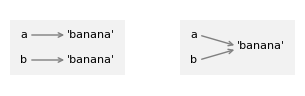
In the diagram on the left, a and b refer to two different objects that have the
same value. In the diagram on the right, they refer to the same object.
To check whether two variables refer to the same object, you can use the is operator.
a = 'banana'
b = 'banana'
a is b
True
In this example, Python only created one string object, and both a
and b refer to it.
But when you create two lists, you get two objects.
a = [1, 2, 3]
b = [1, 2, 3]
a is b
False
So the state diagram looks like this.
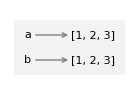
In this case we would say that the two lists are equivalent, because they have the same elements, but not identical, because they are not the same object. If two objects are identical, they are also equivalent, but if they are equivalent, they are not necessarily identical.
### EXERCISE: Objects and Values
x = [10, 20, 30]
y = x
z = [10, 20, 30]
# 1. Check if x and y refer to the same object using "is"
# 2. Check if x and z have the same value using "=="
# 3. Check if x and z refer to the same object using "is"
### Your code starts here:


### Your code ends here.
x is y: True
x == z: True
x is z: False
5.7.2. Aliasing#
If a refers to an object and you assign b = a, then both variables refer to the same object.
a = [1, 2, 3]
b = a
b is a
True
So the state diagram looks like this.
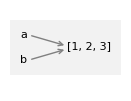
The association of a variable with an object is called a reference. In this example, there are two references to the same object.
An object with more than one reference has more than one name, so we say the object is aliased.
If the aliased object is mutable, changes made with one name affect the other.
In this example, if we change the object b refers to, we are also changing the object a refers to.
b[0] = 5
a
[5, 2, 3]
So we would say that a “sees” this change.
Although this behavior can be useful, it is error-prone.
In general, it is safer to avoid aliasing when you are working with mutable objects.
For immutable objects like strings, aliasing is not as much of a problem. In this example:
c = 'banana'
d = 'banana'
It almost never makes a difference whether a and b refer to the same
string or not.
### EXERCISE: Aliasing
a = [1, 2, 3]
# 1. Create an alias b that points to the same list as a
# 2. Modify the list through b by changing the first element to 99
# 3. Create a true copy c using slicing
# 4. Modify c and observe that a remains unchanged
### Your code starts here:


### Your code ends here.
a after aliasing: [99, 2, 3]
b: [99, 2, 3]
Same object? True

a after copying: [99, 2, 3]
c: [99, 777, 3]
Same object? False
5.7.3. List Arguments in Functions#
When you pass a list to a function, the function gets a reference to the
list. If the function modifies the list, the caller sees the change. For
example, pop_first uses the list method pop to remove the first element from a list.
def pop_first(lst):
    return lst.pop(0)
We can use it like this.
letters = ['a', 'b', 'c']
pop_first(letters)
'a'
The return value is the first element, which has been removed from the list – as we can see by displaying the modified list.
letters
['b', 'c']
In this example, the parameter lst and the variable letters are aliases for the same object, so the state diagram looks like this:
[np.float64(2.05), np.float64(1.22), np.float64(1.06), np.float64(0.85)]
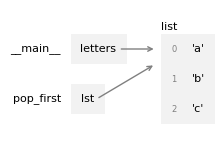
Passing a reference to an object as an argument to a function creates a form of aliasing. If the function modifies the object, those changes persist after the function is done.
### EXERCISE: List Arguments in Functions
def add_item(lst, item):
    """Add item to list and return the list"""
    lst.append(item)
    return lst

# 1. Create a list with [1, 2, 3], call it original
# 2. Call add_item with your list and the value 4,
#    save the result in a variable called updated
# 3. Print the original list to see if it changed after calling the function
# 4. check if original and updated refer to the same object using "is"
### Your code starts here:


### Your code ends here.
Original list: [1, 2, 3]
Returned list: [1, 2, 3, 4]
Original list after function call: [1, 2, 3, 4]
Same object? True
5.7.4. The all() and any() Functions#
Python provides two built-in functions for checking Boolean conditions across list elements:
all(iterable): ReturnsTrueif all elements are truthy (or if the list is empty)any(iterable): ReturnsTrueif at least one element is truthy
These are particularly useful when combined with list comprehensions or generator expressions.
# all() - check if all elements satisfy a condition
numbers = [2, 4, 6, 8, 10]

# Check if all numbers are even
all_even = all(num % 2 == 0 for num in numbers)
print(f"All numbers even? {all_even}")

# Check if all numbers are positive
all_positive = all(num > 0 for num in numbers)
print(f"All numbers positive? {all_positive}")

# With a list containing a negative number
mixed = [2, 4, -6, 8]
all_positive_mixed = all(num > 0 for num in mixed)
print(f"All mixed numbers positive? {all_positive_mixed}")
All numbers even? True
All numbers positive? True
All mixed numbers positive? False
# any() - check if at least one element satisfies a condition
numbers = [1, 3, 5, 7, 9]

# Check if any number is even
has_even = any(num % 2 == 0 for num in numbers)
print(f"Has any even number? {has_even}")

# Check if any number is greater than 5
has_large = any(num > 5 for num in numbers)
print(f"Has number > 5? {has_large}")

# Practical example: check if any word is longer than 10 characters
words = ['hello', 'world', 'programming', 'python']
has_long_word = any(len(word) > 10 for word in words)
print(f"Has word longer than 10 chars? {has_long_word}")
Has any even number? False
Has number > 5? True
Has word longer than 10 chars? True
Common use cases:
Validation:
all(score >= 60 for score in scores)- check if all students passedSearch:
any(word.startswith('py') for word in words)- check if any word starts with ‘py’Data quality:
all(value is not None for value in data)- check for missing data
Note: Both all() and any() use short-circuit evaluation—they stop as soon as the result is determined, making them efficient for large lists.
### EXERCISE: all() and any() Functions
numbers = [2, 4, 6, 8, 9]
words = ['python', 'java', 'javascript', 'go']
# 1. Check if all numbers are even using list comprehension (print)
# 2. Check if any word starts with 'j' using the
#    method ".startswith()" and list comprehension (print)
# 3. Check if any number is greater than 10 (print)
### Your code starts here:


### Your code ends here.
All numbers even: False
Any word starts with 'j': True
Any number > 10: False