
2.1. Variables and Objects#
2.1.1. Variables#
Programs need a way to remember values. In Python, a variable is a named location in computer memory that refers to an object. The object stores the value; the name lets your program use that value again. Think of a variable as a name/label that is associated with some data. Variables are fundamental to programming because they allow us to store, retrieve, and manipulate data throughout our program.
Unlike some other programming languages, Python doesn’t require you to declare the data type of a variable before using it. The type is automatically determined based on the value you assign (this is called dynamic typing).
2.1.1.1. Creating Variables#
In Python, you create a variable by using an assignment statement with the assignment operator =. Read the assignment statement syntax below as “assign the value on the right to the name on the left.” Python evaluates the right side first, then stores the reference in the name.
variable_name = value (an expression)
An assignment statement has three parts:
the name of the variable on the left,
the assignment operator,
=, andan expression (the value) on the right.
Note that:
A variable is a name that refers to a value.
When you run an assignment statement, there is no output. Python creates the variable and gives it a value, but the assignment statement has no visible effect.
A literal value is also an expression.
After creating a variable, you can use it as an expression.
Variables can be reassigned.
You can assign multiple values/expressions to multiple variables in one line.
For example, you can create variables as follows.
x = 1
age = 20
name = "Alice"
pi = 3.14
is_active = True
You can assign multiple values/expressions to multiple variables in one line. For example:
assign multiple variables the same value
assign multiple variables different values
x = y = z = 0           # x, y, and z are all 0
a, b, c = 10, 20, 30    # assign different values to variables

print(f"x = {x}, y = {y}, z = {z}")
print(f"a = {a}, b = {b}, c = {c}")
x = 0, y = 0, z = 0
a = 10, b = 20, c = 30
Or, you can swap variable values by switching the positions of variables.
m, n = 5, 10            # m is 5 and n is 10
print(f"Before swap:\t m = {m}, n = {n}")

m, n = n, m             # Swap values using tuple unpacking ==> sorting
print(f"After swap:\t m = {m}, n = {n}")
Before swap:	 m = 5, n = 10
After swap:	 m = 10, n = 5
A name can be rebound to a different object. Reassignment does not edit the old object; it makes the name refer to another object.
x = 10         # x is 10
x = 20.5       # now x is 20.5
x = "hello"    # now x is a string (type can change!)
print(x)
hello
label = "draft"
print(label)

label = "final"
print(label)

print("label was", label, "and is now", label)
print(f"label was {label} and is now {label}")  # f-string
draft
final
label was final and is now final
label was final and is now final
2.1.1.1.1. State diagrams#
A common way to represent variables on paper is to write the name with an arrow pointing to its value.
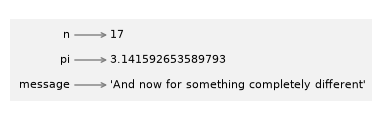
This kind of figure is called a state diagram because it shows what state each of the variables is in (think of it as the variable’s state of mind). This represents a model of how Python stores variables and their values.
2.1.1.2. Naming Conventions#
General Python variable naming follows the convention from the official PEP 8 style guidelines, although conventions such as Google Python:
Length: Names can be as long as you like.
Containing: Names can contain alphanumeric characters (letters and numbers) and underscores. Special characters (e.g., @, #, $) are not allowed.
Begin with: Can begin with an underscore or a letter, but can’t begin with a number.
Letter Case:
Names are case-sensitive.
age,Age, andAGEare three distinct variables.It is conventional to use only lowercase letters for variable names, although it is legal to use uppercase letters.
Use
snake_casefor variable names: All lowercase with underscores between words. Example: total_price, student_name, is_active. (camelCase is for C#/Java/JavaScript variable names.)For class names, use PascalCase, or
upper camel case, convention; e.g.,class StudentRecord.
Avoid keywords and built-in function names for naming variables.
Constants: For constants, use ALL_CAPS with underscores; e.g., MAX_SIZE = 100, PI = 3.14159.
The only punctuation that can appear in a variable name is the underscore character, _. It is often used in names with multiple words, such as your_name or airspeed_of_unladen_swallow.
If you give a variable an illegal name, you get a syntax error. For example, the name million! is illegal because it contains punctuation.
Python programmers follow these conventions (recommended but not required):
Convention |
Use Case |
Example |
|---|---|---|
snake_case |
Variable and function names |
|
UPPER_CASE |
Constants |
|
PascalCase (not camelCase) |
Class names |
|
Descriptive names |
Make code readable |
|
To show all the Python keywords (which you don’t want to use as variable names):
from keyword import kwlist

print("Number of Python keywords:", len(kwlist))
print("First five Python keywords:", kwlist)
Number of Python keywords: 35
First five Python keywords: ['False', 'None', 'True', 'and', 'as', 'assert', 'async', 'await', 'break', 'class', 'continue', 'def', 'del', 'elif', 'else', 'except', 'finally', 'for', 'from', 'global', 'if', 'import', 'in', 'is', 'lambda', 'nonlocal', 'not', 'or', 'pass', 'raise', 'return', 'try', 'while', 'with', 'yield']
Good naming makes code easier to scan and therefore is great for documentation. In Python, variable names usually use snake_case: lowercase words separated by underscores.
Pattern |
Use |
|---|---|
|
regular variable |
|
constant by convention |
|
internal helper name by convention |
Avoid names that shadow common built-ins, such as list, sum, str, or type.
student_count = 28
average_score = 84.6
is_passing = average_score >= 70
print(student_count, average_score, is_passing)
28 84.6 True
### Exercise: Create useful names
# Create variables named course_name, enrolled_students, and average_grade.
# Print a sentence like: Python has 28 students with an average grade of 84.6.
### Your code starts here.


### Your code ends here.
Python has 28 students with an average grade of 84.6.
2.1.1.3. Expressions and Arguments#
After you create a variable, you can use it as an expression. In this example below, the expression is an integer (a literal is an expression in Python).
score = 87
bonus = 5
score = score + bonus     ### expression with + operator
print(score)
92
In the following examples, the expressions are:
a floating-point number
an expression (
pi * 2)
pi = 3.141592653589793
pi2 = pi * 2
message = "This week"
You can also use a variable as part of an expression with arithmetic operators.
print(n + 25)
print(2 * pi)
print(message + " we will learn Python")
30
6.283185307179586
This week we will learn Python
And you can use variables as the arguments when you call a function.
print(round(pi))       ### "round()" is a built-in function
print(len(message))    ### the number of characters in the string
3
9
course = "Python"
week = 2
print(course)
print(week)
Python
2
### Exercise: Compute with variables
# A fruit stand sells apples for 0.65 dollars each.
# 1. Create the variables apple_price (0.65) and apple_count (12).
# 2. Use them in an expression to create the variable total_cost.
# 3. Pass total_cost as an argument to round() to round it to 1 decimal place.
# 4. Print a sentence like: 12 apples cost 7.8 dollars.
### Your code starts here.


### Your code ends here.
7.800000000000001
12 apples cost 7.8 dollars.
2.1.2. Python Objects#
In Python, everything is an object, including classes, instances of classes, modules, and functions. In short, anything that you can point a variable to is an object. Variables in Python do not save values as buckets containing things; they’re pointers pointing to objects.
In Python, “everything is an object”, and every object has a value, a type, and an identity:
identity (unique ID) (
id()): Each object has a unique identifier that remains constant for the object’s lifetime. You can retrieve it with the built-inid()function. In CPython, the standard Python interpreter, this number is the object’s memory address; other Python implementations may use a different number.value: This represents the data that the object stores.
type (data type): An object’s type defines what kind of data it represents and what operations can be performed on it. The type of an object can be determined using the built-in type() function, and every object is an instance of some class.
You can use type() to inspect the kind of data the object refers to, and use id() to find the identification the object has.
2.1.2.1. Data Type#
The values that are associated with the object can be checked by using thetype() function.
### check data type

items = 12
price = 4.99
name = "notebook"
in_stock = True

print(type(items))
print(type(price))
print(type(name))
print(type(in_stock))
<class 'int'>
<class 'float'>
<class 'str'>
<class 'bool'>
2.1.2.2. Object ID#
In Python, every object has a unique identity, which can be obtained using the built-in id() function. An identity is a unique integer that remains constant for an object throughout its lifetime. This is useful for understanding how Python manages objects in memory and for distinguishing between objects that have the same value.
You can use the id() function when you need to reason about identity. In the examples below, each variable is bound to a different object, so each id() is different.
### different objects have different IDs

num1 = 42
num2 = 3.14
greeting = "hello"
fruits = ["apple", "banana", "cherry"]

print(id(num1))
print(id(num2))
print(id(greeting))
print(id(fruits))
140589755770856
140588853664432
140589657824048
140588853300736
2.1.2.3. Mutability#
Some objects can be changed after the variables are created, and some can not:
Mutable: Data collection types such as
list,dict(dictionary), andsetare mutable. After creating variables with such data, you may change (update) the data.Immutable: Data types such as integers, floats, strings, booleans,
None, and tuples are immutable. You can not change (update) the value after the variables are created. In order to change the object value to the variable name, you have to perform a new assignment (reassignment).
Action |
What actually happens |
Identity ( |
|---|---|---|
Reassignment ( |
|
Changes |
Mutation ( |
The same object’s contents change in place |
Stays the same |
### mutation: different value, same ID

x = [1, 2, 3]

print(x, id(x))

x.append(4)     ### mutation; data (object) updated

print(x, id(x))
[1, 2, 3] 140588851931392
[1, 2, 3, 4] 140588851931392
### reassignment: different value, different ID

num = 5
print(num, id(num))

num = 5 + 1      ### reassignment; new object created
print(num, id(num))
5 140589755769672
6 140589755769704
A note on identity
Assignment does not create an object or an ID; it binds a name to an object. In num = 5 + 1, the expression 5 + 1 produces the object and the assignment binds num to it. Assigning one name to another, as in b = a, creates no new object at all: both names refer to the same object and share one ID. Two names for the same object are called aliases.
When two names are bound to separately created objects, the IDs usually differ even if the values are equal. For immutable types, however, Python may reuse an existing object instead of creating a new one to save memory, so equal values may share an ID.
In the example below, small integer literals are interned — reused as the same object — as a memory optimization. This is a CPython implementation detail, not something your code should ever rely on.
### aliasing: two names, one object

a = [1, 2, 3]
b = a           ### no new object; b is bound to the same list
print(id(a))
print(id(b))
print(a is b)
140588851939136
140588851939136
True
### small int, same IDs

num1=100
num2=100
print(id(num1))
print(id(num2))
140589755772712
140589755772712
### large int, different IDs

num1=1000
num2=1000
print(id(num1))
print(id(num2))
140588853669328
140588853077968
### None, same ID

a = None
b = None
print(id(a))
print(id(b))
140589754771648
140589754771648
2.1.2.4. Aliasing#
Aliasing happens when two or more variable names refer to the same object in memory, rather than each having its own independent copy. Because they point to the same object, changing the object through one name is visible through the other name too.
When two names refer to the same mutable object, changing the object through one name affects what you see through the other name. This is called aliasing, meaning different variables with the same value will have not only the same values but also the same IDs.
Let’s start with creating two list variables by using two assignment statements and observe their values and IDs. You can see that they have the same values but with different IDs.
a = [10, 20, 30]
b = [10, 20, 30]

print(a)
print(b)

print(id(a))
print(id(b))
[10, 20, 30]
[10, 20, 30]
140588853531840
140588853531712
Now we’ll check their value equality and identity by using the keyword is and the operator ==. You see that they have the same value, but they are different objects; which means the value binds to list b is a different copy from list a. They just happen to be the same value.
print(a == b)             ### True; same value
print(a is b)             ### False; different ID == different objects
True
False
Since variables are just names, two variables can point to the same object — and if that object is mutable, changing it through one name is visible through the other.
In the example below, you can see that both list a and b have the same value and the same ID.
### a and b have the same value and the same ID
a = [10, 20, 30]
b = a     ### b is now an ALIAS for a — same object, not a copy

print(a)
print(b)

print(id(a))
print(id(b))
[10, 20, 30]
[10, 20, 30]
140588853531520
140588853531520
Since they have the same ID, both variable names point to the same object. The data variable a points to is the same copy b points to – there’s only one copy (same object).
2.1.2.4.1. Sameness#
Here, you use the == operator to check value equality and the is keyword to check object identity.
Equality Operators:
==and!=. These check if two values are equal (have the same content).Identity Operator:
is. This checks if two variables point to the same object in memory (aliasing!).
As a summary of the equity and identiity operators:
Operator |
Purpose |
Example |
What it checks |
|---|---|---|---|
|
Equality |
|
Do they have the same content? |
|
Inequality |
|
Do they have different content? |
|
Identity |
|
Do they point to the same object? |
|
Non-identity |
|
Do they point to different objects? |
Or, simply:
Operator |
Checks |
Meaning |
|---|---|---|
|
Identity |
Same object |
|
Equality |
Same value |
print(a == b)             ### True; same value
print(a is b)             ### True; same ID == same object
True
True
The surprising side effect is that if you update the value of one variable, the other variable will reflect the change as well, since they are the same object.
a = [10, 20, 30]
b = a                     ### b is an "alias" of a

print(a)                  ### [10, 20, 30]
print(b)                  ### [10, 20, 30]

print()

print("a == b: ", a == b)     ### '==' for equality (same value) test
print("a is b: ", a is b)     ### '==' for equality (same value) test
print("id(a) == id(b) ", id(a) == id(b))
print(a, id(a))         ### a is changed as well because a and b are the same object
print(b, id(b))

print()

print("b.append(40)")
b.append(40)     ### change b

print()

print(a, id(a))         ### a is changed as well because a and b are the same object
print(b, id(b))
[10, 20, 30]
[10, 20, 30]

a == b:  True
a is b:  True
id(a) == id(b)  True
[10, 20, 30] 140588852376896
[10, 20, 30] 140588852376896

b.append(40)

[10, 20, 30, 40] 140588852376896
[10, 20, 30, 40] 140588852376896
Another example of aliasing.
nums = [1, 2, 3]
print(f"nums is {nums} and has id {id(nums)}")

alias = nums    ### Create an alias for nums
print(f"alias is {alias} and has id {id(alias)}")

print("\nmodifying the list using the alias...")
alias.append(4) ### Modify the list using the alias
print(f"\nalias is now {alias} and has id {id(alias)}")

print(f"nums is now {nums} too, and has id {id(nums)}")
nums is [1, 2, 3] and has id 140588853529664
alias is [1, 2, 3] and has id 140588853529664

modifying the list using the alias...

alias is now [1, 2, 3, 4] and has id 140588853529664
nums is now [1, 2, 3, 4] too, and has id 140588853529664
This side effect does not happen with literal data types such as strings, which are immutable.
For list and dict collection types, to avoid the side effect of mutable aliasing, you may:
Use reassignment with the alias variable. Reassignment moves one name to a new object; it does not change the original object.
Use the .copy() method to create an independent copy of the original object.
nums = [1, 2, 3]
alias = nums

alias = [1, 2, 3, 4]    #### reassignment to alias
print(nums)
print(alias)
[1, 2, 3]
[1, 2, 3, 4]
### Exercise: Mutation or reassignment?
# For each line below, add a comment saying whether it mutates an object or reassigns a name.
colors = ["red", "green"]
colors.append("blue")
colors = colors + ["purple"]
colors[0] = "orange"
print(colors)
['orange', 'green', 'blue', 'purple']
['orange', 'green', 'blue', 'purple']
### Exercise: Equal or the same object?
# 1. Create the list fruits = ["apple", "banana"].
# 2. Create copy_fruits as a separate list literal with the same items.
# 3. Create alias_fruits as an alias of fruits.
# 4. Print fruits == copy_fruits, fruits is copy_fruits, and fruits is alias_fruits.
# 5. Append "cherry" through alias_fruits, then print fruits and copy_fruits.
### Your code starts here.


### Your code ends here.
True
False
True
['apple', 'banana', 'cherry']
['apple', 'banana']
2.1.3. Summary#
Assignment binds a name to an object.
Objects have values, types, and identities.
==checks equal value;ischecks same object.Mutation changes an object; reassignment changes which object a name refers to.
F-strings are the standard way to combine text and values for output.